
April 27, 2026 at 11:58 am,
No comments
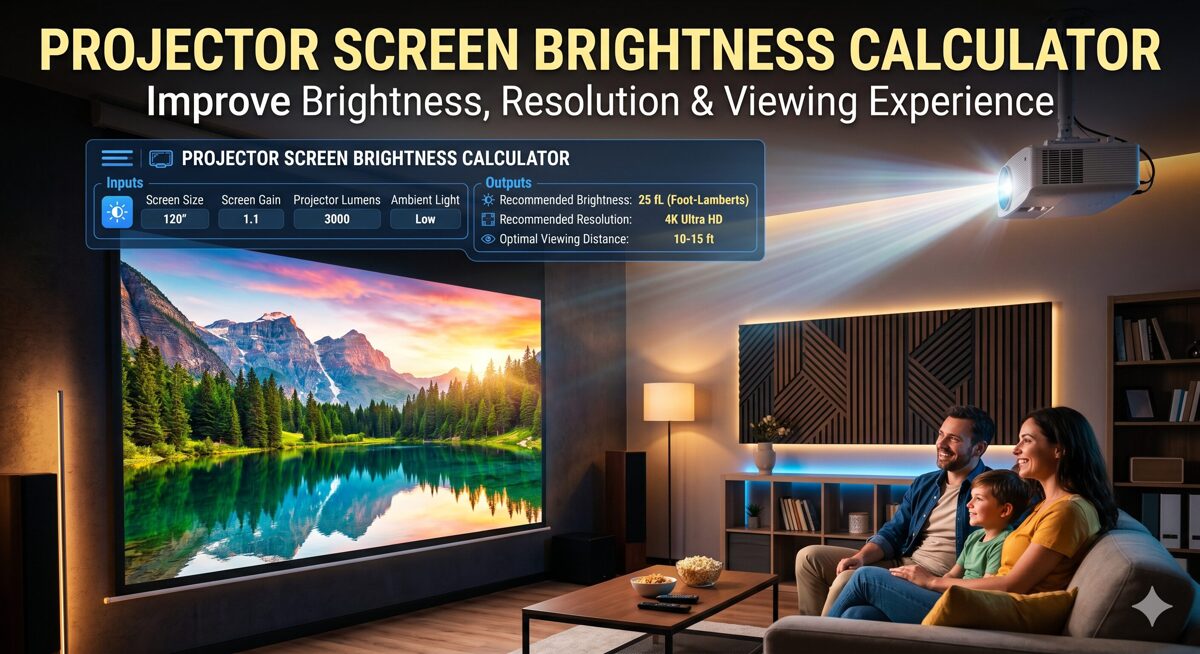
In the world of professional AV installations, nothing frustrates clients more than a washed-out projection image or a screen so dim it strains the eyes. Whether you’re designing a corporate boardroom, home theater, auditorium, or house of worship, getting the projector brightness right is non-negotiable.
Quick Answer: A Projector Screen Brightness Calculator is a specialized tool that determines the optimal lumens requirement for your projection system by analyzing screen size, ambient light conditions, screen gain, throw distance, and viewing environment. It eliminates guesswork, ensures AVIXA-compliant designs, and delivers the perfect balance between brightness, contrast ratio, and visual comfort.
But here’s the challenge: most AV integrators and system designers still rely on rough estimations or basic formulas that don’t account for real-world variables. This leads to:
-
Over-specified projectors (wasting budget)
-
Under-powered systems (disappointing clients)
-
Poor image quality due to incorrect brightness-to-screen-size ratios
-
Failed installations requiring costly rework
That’s why choosing the best free Projector Screen Brightness Calculator is crucial. The right tool doesn’t just calculate lumens—it considers ambient light, screen characteristics, viewing distance, and application-specific requirements to deliver professional-grade recommendations that work in the real world.
This comprehensive guide explores how projector brightness calculators work, why XTEN-AV (X-Draw) stands out as the best free Projector Screen Brightness Calculator for AV companies, and how to leverage these tools to design flawless projection systems every time.
Key Takeaways
✅ Projector Screen Brightness Calculator tools are essential for accurate AV system design, eliminating guesswork and ensuring optimal viewing experiences
✅ Ambient light is the biggest variable—always measure or estimate carefully using foot-candles or lux
✅ Screen gain significantly impacts effective brightness; balance brightness boost vs viewing angle limitations
✅ XTEN-AV stands out as the best free projector brightness calculator for AV companies, offering AVIXA-compliant calculations, scenario simulation, and integrated design workflows
✅ Use a 10-20% brightness buffer above calculated minimums to account for lamp degradation and future-proofing
✅ Different applications require vastly different lumen specifications—home theaters (1,500-3,000), conference rooms (4,000-6,500), auditoriums (10,000-20,000+)
✅ Lens shift preserves full brightness; avoid keystone correction which reduces effective lumens by 10-20%
✅ Modern AI-powered calculators offer automated recommendations, projector suggestions, and cost optimization features
✅ Always document environmental assumptions in proposals to protect against scope changes
✅ Integration matters—choose calculators that connect with proposal generation, project management, and complete AV design platforms
✅ Screen technology (matte white, high-gain, ALR, gray) dramatically affects perceived brightness and viewing experience
✅ For professional credibility, always use AVIXA standards and ANSI lumens in specifications
A Projector Screen Brightness Calculator (also called a projector brightness calculator or projector calculator) is a specialized AV design tool that determines the minimum lumens output required for a projector based on:
Core Input Variables:
✅ Screen dimensions (width and height in feet or meters)
✅ Screen gain (reflectivity coefficient, typically 0.8 to 3.0)
✅ Ambient light levels (foot-candles or lux)
✅ Viewing application (presentation, cinema, worship, simulation)
✅ Desired image quality (contrast ratio and brightness uniformity)
✅ Throw distance and projector placement
Output Provided:
🎯 Recommended lumens (ANSI lumens or ISO lumens)
🎯 Brightness per square foot/meter (foot-lamberts or nits)
🎯 Contrast ratio expectations
🎯 Projector model suggestions
🎯 Screen gain optimization recommendations
Why Generic Lumen Charts Fail (And Why You Need a Proper Calculator)
The Problem with “Rule-of-Thumb” Approaches
Many AV professionals still use outdated methods:
-
“100-inch screen = 3000 lumens” (ignores ambient light)
-
“Dark room = 1500 lumens is fine” (ignores screen gain)
-
“Brighter is always better” (ignores eye fatigue and hotspotting)
Real-World Variables These Rules Ignore:
|
Factor |
Impact on Brightness |
|
Ambient light |
+200% to +400% lumen requirement |
|
Screen gain |
±50% effective brightness |
|
Screen size |
Non-linear relationship with lumens |
|
Viewing angle |
Affects perceived brightness |
|
Content type |
Text vs video vs graphics |
|
Room geometry |
Light reflection and absorption |
|
Example scenario: |
-
Conference room: 120″ screen, moderate ambient light (30 fc), white matte screen (gain 1.0)
-
Basic formula says: 4000 lumens
-
Proper calculator accounts for ambient light and recommends: 6500 lumens
The difference? A usable presentation system vs. barely visible content.
Step-by-Step Guide: Using a Projector Screen Brightness Calculator
Step 1: Measure Your Screen Dimensions
Start with accurate screen size measurements:
-
Width (measured in feet, inches, or meters)
-
Height (maintain aspect ratio: 16:9, 16:10, 4:3)
-
Diagonal (optional but helpful for verification)
Pro tip: Always design for the actual viewable area, not frame dimensions.
Learn more about sizing: How to Calculate Projector Screen Size for Home Theater
Step 2: Assess Ambient Light Conditions
Ambient light is the biggest variable affecting brightness requirements.
Measurement Methods:
-
Light meter (measures foot-candles or lux)
-
Visual assessment (bright office, dimmed conference room, pitch-black theater)
-
Time-of-day analysis (natural light variation)
Common Environments:
|
Environment |
Ambient Light |
Lumen Multiplier |
|
Dark home theater |
0-5 fc |
1.0x (baseline) |
|
Dimmed conference room |
10-20 fc |
1.5-2.0x |
|
Standard office |
30-50 fc |
2.5-3.5x |
|
Bright classroom |
50-70 fc |
4.0-5.0x |
|
Retail/showroom |
70+ fc |
5.0-7.0x |
|
XTEN-AV’s brightness calculator includes pre-configured lighting scenarios for common applications. |
Step 3: Determine Screen Gain
Screen gain measures how much light a screen reflects compared to a standard matte white surface (gain = 1.0).
Screen Gain Types:
-
0.8-1.0 (matte white): Wide viewing angle, neutral color
-
1.3-1.8 (high-gain): Brighter image, narrower viewing cone
-
2.0-3.0 (ultra-high-gain): Maximum brightness, very narrow angle
Trade-off: Higher gain = brighter center, but hotspotting and reduced off-axis viewing.
Best practice: Use 1.0-1.3 gain for most applications unless dealing with extreme ambient light.
Step 4: Define Application and Image Quality Goals
Different applications have different brightness standards:
AVIXA Brightness Recommendations:
|
Application |
Target Brightness |
Minimum Lumens |
|
Home theater (dark) |
12-16 ft-L |
Varies by screen |
|
Presentation (dimmed) |
15-25 ft-L |
Higher lumens |
|
Data/graphics (lit) |
25-40 ft-L |
Highest lumens |
|
Simulation/training |
30-50 ft-L |
Premium projectors |
|
XTEN-AV uses AVIXA standards as the foundation for its calculations. |
Also read: Choosing the Right Projector Lumens for Every Scenario
Step 5: Input Variables into the Calculator
Open your projector brightness calculator (like XTEN-AV) and enter:
-
Screen width and height
-
Screen gain value
-
Ambient light level (foot-candles or descriptive)
-
Application type (presentation, cinema, etc.)
-
Viewing distance (optional for comfort assessment)
Step 6: Review Calculated Lumens Requirement
The calculator outputs:
✅ Minimum recommended lumens
✅ Optimal lumens range
✅ Brightness uniformity (center vs edges)
✅ Contrast ratio expectations
Example output:
-
Screen: 150″ diagonal (16:9), gain 1.0
-
Ambient light: 30 fc (conference room)
-
Application: Business presentations
-
Result: Minimum 7,500 lumens, optimal 9,000-10,000 lumens
Step 7: Select Appropriate Projector
Use the lumen requirement to filter projectors:
-
Laser projectors (10,000+ lumens, maintenance-free)
-
Lamp-based projectors (cost-effective for lower lumens)
-
LED projectors (lower lumens, longer lifespan)
XTEN-AV suggests projector models based on calculated requirements and budget.
For throw distance and lens selection, read this blog: How to Choose the Right Projector Lens for Any Auditorium
Step 8: Verify with Throw Distance and Placement
Brightness calculations must align with throw distance requirements:
-
Short throw: 0.4-1.0 throw ratio
-
Standard throw: 1.0-2.0 throw ratio
-
Long throw: 2.0-8.0 throw ratio
Key consideration: Some high-brightness projectors have limited lens options.
Learn more: Projector Placement 101: How to Increase Throw Distance Without Sacrificing Image Quality
Step 9: Account for Brightness Degradation
Projector brightness decreases over time:
-
Lamp-based: 20-30% reduction by half-life (1,000-2,500 hours)
-
Laser: 10-20% reduction over 20,000 hours
Best practice: Specify 10-15% above calculated minimum to maintain performance throughout projector lifespan.
Step 10: Document and Present Recommendations
Professional AV proposals should include:
📋 Brightness calculation summary
📋 Projector specifications
📋 Screen recommendations
📋 Environmental considerations
📋 Installation requirements
XTEN-AV integrates with X-DOC for automated proposal generation from brightness calculations.
Key Features That Make XTEN-AV the Best Free Projector Screen Brightness Calculator for AV Companies
XTEN-AV has emerged as the industry-leading free projector brightness calculator, trusted by AV system integrators, consultants, and designers worldwide. Here’s what sets it apart:
1. Environment-Aware Brightness Calculation (Beyond Basic Lumens)
Unlike basic tools that just map lumens to screen size, XTEN-AV treats brightness as a system-level variable.
Considers:
-
Ambient light conditions (measured or scenario-based)
-
Screen gain (reflectivity and viewing angle)
-
Room environment (size, color, reflective surfaces)
-
Viewing requirements (critical vs casual viewing)
👉 Result: Real-world accurate brightness recommendations, not theoretical guesses
2. Instant, Data-Driven Lumens Recommendation
Enter:
Get:
-
Exact lumen requirement within seconds
-
Brightness distribution map
-
Contrast ratio projections
👉 Eliminates manual calculations and reduces design errors
3. AVIXA Standards-Based Calculations
Built using AVIXA projection standards (contrast ratio & visibility benchmarks).
Ensures:
👉 Critical for consultants working on commercial AV projects
4. Screen Parameter Integration (Size + Gain + Geometry)
The tool doesn’t isolate brightness—it integrates key screen variables:
👉 Result: Accurate brightness aligned with actual projection physics, not assumptions
5. Scenario-Based Simulation (Real Project Optimization)
One of the most powerful differentiators:
Test multiple scenarios:
-
High ambient light vs controlled lighting
-
Different screen gains (1.0 vs 1.5 vs 2.0)
-
Alternative projector outputs (7K vs 10K vs 12K lumens)
👉 Helps optimize:
Example: Adjusting room lighting can reduce required lumens by 30-40%, saving thousands on projector costs.
6. Projector Recommendation Capability
Suggests suitable projectors based on calculated brightness:
Aligns with:
-
Budget constraints
-
Resolution requirements (1080p, 4K, WUXGA)
-
Performance needs (laser vs lamp)
👉 Converts calculation into actionable product decisions
7. Integrated AV Design Ecosystem
This is where XTEN-AV dominates most tools:
The brightness calculator connects with:
-
Screen size calculator
-
Throw distance calculator
-
Full AV design platform (X-Draw)
-
Proposal generation (X-DOC)
-
Project management (X-PRO)
👉 Meaning: You don’t just calculate—you design the entire system in one workflow
8. Ultra-Fast, User-Friendly Interface
👉 Designed for:
-
Sales engineers making quick assessments
-
Consultants on client calls
-
Quick proposal generation
9. Accuracy That Improves Client Satisfaction
Incorrect brightness leads to:
-
Washed-out images
-
Eye strain
-
Poor user experience
-
Dissatisfied clients
XTEN-AV solves this by:
-
Matching brightness to real conditions
-
Ensuring optimal contrast and clarity
-
Accounting for real-world variables
👉 Leads to: Better project outcomes and fewer revisions
10. Eliminates Guesswork & Manual Errors
Traditional approach:
-
Manual formulas
-
Trial-and-error setups
-
Inconsistent results
XTEN-AV approach:
-
Automated, data-driven calculation
-
Repeatable, consistent results
-
Professional documentation
👉 Outcome:

Understanding the Science Behind Projector Brightness
Key Brightness Metrics Explained
1. ANSI Lumens
Definition: Standardized measure of light output from a projector, measured using the ANSI (American National Standards Institute) method.
Typical ranges:
-
Home theater: 1,500-3,000 lumens
-
Business: 3,000-5,000 lumens
-
Large venue: 5,000-30,000+ lumens
2. Foot-Lamberts (ft-L)
Definition: Measure of brightness on the screen surface (luminance).
Formula:
Foot-Lamberts = (Lumens × Screen Gain) ÷ Screen Area (sq ft)
SMPTE standards:
-
Cinema: 14-16 ft-L
-
Presentation: 15-25 ft-L
3. Lux and Foot-Candles (fc)
Ambient light measurements:
4. Contrast Ratio
Definition: Ratio of brightest white to darkest black a projector can produce.
Impact:
-
Low contrast (500:1): Washed-out images in ambient light
-
High contrast (10,000:1+): Rich blacks, vibrant colors
Note: Ambient light destroys contrast more than low projector specs.
How to Choose the Best Projector Screen Brightness Calculator
When evaluating brightness calculators, consider:
✅ 1. Accuracy and Standards Compliance
-
Does it use AVIXA or SMPTE standards?
-
Does it account for ambient light?
-
Does it consider screen gain?
✅ 2. Input Flexibility
-
Can you input exact measurements?
-
Does it support multiple units (feet, meters)?
-
Can you specify custom environments?
✅ 3. Real-World Variables
✅ 4. Output Detail
✅ 5. Integration with Design Workflow
-
Standalone or part of a larger AV design platform?
-
Can you export calculations?
-
Integration with proposal tools?
✅ 6. Ease of Use
-
Intuitive interface?
-
Fast results?
-
Mobile accessible?
✅ 7. Cost
XTEN-AV excels in all these areas, offering a free, professional-grade tool integrated into a comprehensive AV design ecosystem.
Common Mistakes in Projector Brightness Calculation (And How to Avoid Them)
Mistake 1: Ignoring Ambient Light
Problem: Using a dark-room formula for a lit conference room
Solution: Always measure or estimate ambient light accurately. Use a projector calculator that accounts for lighting conditions.
Impact: Under-specification can lead to 50-70% reduction in perceived image quality.
Mistake 2: Overlooking Screen Gain
Problem: Assuming all screens are gain 1.0
Solution: Confirm actual screen gain with manufacturer specs. High-gain screens can compensate for lower lumens but reduce viewing angles.
Trade-off: A gain 1.8 screen can reduce lumen requirements by 40-50% but creates hotspotting and uneven brightness.
Mistake 3: Using Diagonal Instead of Width/Height
Problem: Inputting diagonal screen size when calculators need width and height
Solution: Convert diagonal to width/height based on aspect ratio:
-
16:9 aspect: Width = 0.872 × Diagonal
-
16:10 aspect: Width = 0.848 × Diagonal
-
4:3 aspect: Width = 0.8 × Diagonal
XTEN-AV accepts both formats and auto-converts.
Mistake 4: Not Accounting for Brightness Degradation
Problem: Specifying exact calculated lumens without overhead
Solution: Add 10-20% buffer for:
-
Lamp aging
-
Dust accumulation
-
Eco mode operation
Mistake 5: Ignoring Content Type
Problem: Using cinema standards for data presentations
Solution: Match brightness to content requirements:
Mistake 6: Overlooking Viewing Distance
Problem: Specifying brightness without considering viewer comfort
Solution: For close viewing (home theaters), lower brightness reduces eye strain. For large venues, higher brightness compensates for distance.
Explore setup tips: How to Set Up a Projector in Your Bedroom for the Ultimate Movie Night
Mistake 7: Treating All Lumens Equally
Problem: Comparing rated lumens across different brands without context
Solution:
-
Use ANSI lumens (standardized)
-
Consider center vs corner brightness
-
Check color brightness (not just white lumens)
The Role of AI and Automation in Modern Brightness Calculation
Artificial Intelligence is transforming how AV professionals design projection systems:
1. Intelligent Environment Analysis
AI algorithms can analyze:
-
Room photos to estimate ambient light
-
Architectural drawings to identify reflective surfaces
-
Usage patterns to predict lighting conditions
Future capability: Upload a room photo, get instant brightness recommendations.
2. Predictive Optimization
Machine learning can predict:
3. Automated Design Validation
AI-powered tools can:
-
Flag under-specified systems
-
Suggest alternative configurations
-
Optimize budget allocation
XTEN-AV’s roadmap includes expanded AI-driven recommendations through its XAVIA engine.
4. Real-Time Adjustment Recommendations
Smart calculators can suggest:
-
Dimming ambient lights to reduce lumen requirements
-
Changing screen gain for cost savings
-
Alternative screen sizes for better performance
Best Practices for Professional Projector Brightness Design
1. Always Measure Ambient Light
Use a light meter for accurate readings. Don’t rely on guesses.
Tools:
2. Design for Worst-Case Scenarios
Consider:
-
Maximum ambient light (windows, overhead lights)
-
Peak occupancy (body heat affects air handling)
-
End-of-life projector brightness
3. Specify Brightness Range, Not Single Value
Instead of “8,000 lumens,” recommend:
-
Minimum: 7,500 lumens
-
Optimal: 8,500-9,500 lumens
-
Maximum: 10,000 lumens (for future-proofing)
4. Document Environmental Assumptions
In your AV proposal, clearly state:
-
Assumed ambient light levels
-
Screen gain used in calculations
-
Viewing conditions (dimmed, lit, etc.)
This protects you if conditions change.
5. Consider Total Cost of Ownership
Higher-lumen projectors often mean:
Balance brightness with operational costs.
6. Coordinate with Lighting Control
Integrate projection systems with:
This allows dynamic brightness optimization.
7. Test Before Final Installation
Whenever possible:
-
Mock up the system in similar conditions
-
Validate brightness with actual equipment
-
Get client approval before final installation
Projector Brightness Calculator Comparison
|
Feature |
XTEN-AV |
Basic Online Calc |
Manual Formula |
|
Ambient light consideration |
✅ Yes |
⚠️ Limited |
❌ No |
|
Screen gain integration |
✅ Yes |
⚠️ Basic |
❌ No |
|
AVIXA standards-based |
✅ Yes |
❌ No |
⚠️ If you know it |
|
Scenario simulation |
✅ Yes |
❌ No |
❌ No |
|
Projector recommendations |
✅ Yes |
❌ No |
❌ No |
|
Integrated AV design |
✅ Yes |
❌ No |
❌ No |
|
Real-time collaboration |
✅ Cloud-based |
❌ No |
❌ No |
|
Professional documentation |
✅ Yes |
❌ No |
❌ No |
|
Cost |
✅ Free |
✅ Free |
✅ Free |
|
Accuracy |
✅ Excellent |
⚠️ Fair |
⚠️ Varies |
Understanding Lumens Requirements for Different Applications
Home Theater (Dark Environment)
Typical specs:
-
Screen size: 100-150″ diagonal
-
Ambient light: 0-5 foot-candles
-
Target brightness: 12-16 ft-L
-
Recommended lumens: 1,500-2,500
Key considerations:
Detailed guide: How Many Lumens Do You Need for a Home Theater Projector?
Home Theater (Ambient Light Present)
Typical specs:
-
Screen size: 100-120″ diagonal
-
Ambient light: 10-15 foot-candles
-
Target brightness: 16-20 ft-L
-
Recommended lumens: 2,500-3,500
Key considerations:
-
ALR (Ambient Light Rejecting) screens help
-
Balance brightness with color accuracy
-
Consider time-of-day usage patterns
DIY builders: How to Build a DIY Projector Setup for Your Bedroom
Conference Room (Standard)
Typical specs:
-
Screen size: 100-150″ diagonal
-
Ambient light: 25-35 foot-candles
-
Target brightness: 20-30 ft-L
-
Recommended lumens: 4,000-6,500
Key considerations:
-
Dimming control reduces lumen requirements
-
Motorized screens for multi-use rooms
-
Wireless presentation integration
Also read: Best AV Solutions for Small Conference Rooms
Large Conference Room / Boardroom
Typical specs:
-
Screen size: 150-200″ diagonal
-
Ambient light: 30-40 foot-candles
-
Target brightness: 25-35 ft-L
-
Recommended lumens: 7,000-10,000
Key considerations:
-
Laser projectors for reliability
-
Edge blending for ultra-wide displays
-
Integration with video conferencing
Also read: 9 Conference Room Cable Management Platforms That Boost Productivity
Auditorium / Lecture Hall
Typical specs:
-
Screen size: 200-300″ diagonal
-
Ambient light: 20-40 foot-candles
-
Target brightness: 25-40 ft-L
-
Recommended lumens: 10,000-20,000
Key considerations:
-
Long throw lenses required
-
High resolution (WUXGA, 4K)
-
Reliable, low-maintenance (laser)
Lens selection: How to Choose the Right Projector Lens for Any Auditorium
House of Worship
Typical specs:
-
Screen size: 200-400″ diagonal
-
Ambient light: Variable (15-50 fc)
-
Target brightness: 25-40 ft-L
-
Recommended lumens: 10,000-30,000
Key considerations:
-
Multiple projectors for large screens
-
Image blending and warping
-
Quiet operation during services
Simulation and Training
Typical specs:
-
Screen size: Varies widely
-
Ambient light: Controlled (5-20 fc)
-
Target brightness: 30-50 ft-L
-
Recommended lumens: 5,000-15,000 per projector
Key considerations:
-
High refresh rates (120 Hz+)
-
Low latency
-
Precise color calibration
-
Multi-channel synchronization
Advanced Brightness Optimization Techniques
1. Dynamic Brightness Management
Modern projectors offer:
-
Eco mode (reduces brightness and power)
-
Auto brightness adjustment (based on content)
-
Scheduled brightness profiles (time-of-day optimization)
Best practice: Design for full brightness but operate in eco mode for extended lamp life.
2. Screen Surface Selection
Screen technology dramatically impacts perceived brightness:
Matte White (Gain 1.0)
-
Pros: Wide viewing angle, neutral color
-
Cons: Lower effective brightness
-
Best for: Dark rooms, home theaters
High-Gain (1.3-1.8)
-
Pros: Brighter image, combats ambient light
-
Cons: Narrower viewing cone, potential hotspotting
-
Best for: Conference rooms, moderate ambient light
ALR (Ambient Light Rejecting)
-
Pros: Rejects overhead light, maintains contrast
-
Cons: Expensive, specific installation requirements
-
Best for: Bright rooms where dimming isn’t possible
Gray Screens (0.8-0.9 gain)
-
Pros: Better blacks, improved contrast
-
Cons: Requires more lumens
-
Best for: Home theater with high-contrast content
3. Lens Shift vs Keystone Correction
Brightness preservation:
Always prefer optical lens shift over digital keystone.
Learn more: Lens Shift vs Keystone: Which Preserves Focus Better?
4. Multi-Projector Systems
For ultra-large displays or complex geometries:
Benefits:
-
Distributed brightness load
-
Higher total lumens
-
Redundancy (one projector fails, show continues)
Challenges:
XTEN-AV helps calculate per-projector lumen requirements for blended systems.
Frequently Asked Questions (FAQs)
1. What is the best free Projector Screen Brightness Calculator for AV professionals?
XTEN-AV (X-Draw) is widely regarded as the best free option because it:
-
Uses AVIXA standards
-
Accounts for ambient light and screen gain
-
Provides projector recommendations
-
Integrates with a complete AV design platform
-
Offers scenario simulation for optimization
Unlike basic calculators, XTEN-AV treats brightness as a system-level variable, delivering real-world accurate recommendations.
2. How many lumens do I need for a 100-inch screen?
It depends on:
Use a projector brightness calculator for precise recommendations.
3. What is screen gain and why does it matter?
Screen gain measures how much light a screen reflects compared to a standard matte white surface (gain = 1.0).
Impact:
Best practice: Use 1.0-1.3 gain for most applications unless dealing with extreme ambient light.
4. Can I use a home theater projector in a bright room?
Generally no. Home theater projectors (1,500-2,500 lumens) are designed for dark environments.
For bright rooms:
-
Use 4,000+ lumen business-class projectors
-
Add an ALR screen
-
Implement lighting control to dim ambient light
5. How do I calculate lumens for outdoor projection?
Outdoor projection requires significantly higher lumens:
-
After dark: 5,000-10,000 lumens for 150-200″ screens
-
Twilight: 10,000-20,000+ lumens
-
Daylight: Generally not feasible (requires 30,000+ lumens)
Key factors:
-
Screen size (larger = more lumens)
-
Time of day (darker = fewer lumens needed)
-
Reflective surfaces nearby
6. Does projector placement affect brightness?
Yes, indirectly:
-
Off-axis placement may require keystone correction, which reduces brightness
-
Long throw distances don’t reduce lumens, but require brighter initial output for same screen brightness
-
Ceiling bounce and reflections can improve or worsen perceived brightness
Use lens shift whenever possible to maintain full brightness.
7. What’s the difference between ANSI lumens and LED lumens?
-
ANSI lumens: Standardized measurement method (accurate, comparable)
-
LED lumens: Often inflated marketing numbers (not standardized)
Always specify ANSI lumens in professional AV designs.
8. How often should I recalculate brightness for a project?
Recalculate when:
-
Screen size changes
-
Ambient lighting conditions are modified
-
Room layout changes (windows added, walls painted)
-
Projector technology improves (upgrading older systems)
9. Can I use multiple lower-lumen projectors instead of one high-lumen unit?
Yes, for:
-
Ultra-wide displays (edge blending)
-
3D mapping and unconventional surfaces
-
Redundancy in critical applications
Challenges:
-
Color matching
-
Brightness uniformity
-
Increased complexity
XTEN-AV calculates distributed lumen requirements for multi-projector systems.
10. What’s the impact of 4K resolution on brightness?
4K projectors often have:
Design consideration: May need to increase lumens to maintain the same foot-lambert levels as 1080p systems.
Conclusion: Precision Brightness Calculation Drives Project Success
In the competitive world of AV system integration, delivering the perfect viewing experience isn’t about guessing—it’s about precision engineering backed by the right tools.
A Projector Screen Brightness Calculator transforms brightness design from an art into a science, accounting for every variable that impacts image quality: ambient light, screen characteristics, viewing distance, application requirements, and more.
XTEN-AV (X-Draw) has emerged as the industry-leading free tool because it goes beyond basic calculations:
✅ Environment-aware analysis considers real-world conditions
✅ AVIXA standards compliance ensures professional-grade designs
✅ Scenario simulation optimizes cost vs performance
✅ Integrated workflow connects calculation to complete AV design
✅ AI-powered recommendations eliminate guesswork
Whether you’re designing a home theater, corporate boardroom, house of worship, or large auditorium, accurate brightness calculation is the foundation of success.
The difference between a satisfied client and a costly do-over often comes down to those initial calculations. Don’t leave it to chance—use professional tools like XTEN-AV to deliver flawless projection systems every time.
Ready to revolutionize your projector design workflow? Explore how XTEN-AV’s free Projector Screen Brightness Calculator can streamline your next project and ensure perfect brightness every time.
PakarPBN
A Private Blog Network (PBN) is a collection of websites that are controlled by a single individual or organization and used primarily to build backlinks to a “money site” in order to influence its ranking in search engines such as Google. The core idea behind a PBN is based on the importance of backlinks in Google’s ranking algorithm. Since Google views backlinks as signals of authority and trust, some website owners attempt to artificially create these signals through a controlled network of sites.
In a typical PBN setup, the owner acquires expired or aged domains that already have existing authority, backlinks, and history. These domains are rebuilt with new content and hosted separately, often using different IP addresses, hosting providers, themes, and ownership details to make them appear unrelated. Within the content published on these sites, links are strategically placed that point to the main website the owner wants to rank higher. By doing this, the owner attempts to pass link equity (also known as “link juice”) from the PBN sites to the target website.
The purpose of a PBN is to give the impression that the target website is naturally earning links from multiple independent sources. If done effectively, this can temporarily improve keyword rankings, increase organic visibility, and drive more traffic from search results.