

March 26, 2026 at 10:20 am,
No comments
Choosing the right fire protection system design software can be the difference between streamlined project delivery and costly delays. In 2026, fire safety engineers, AV integrators, and system designers face increasing pressure to deliver compliant, accurate, and cost-effective fire protection systems while managing complex regulatory requirements and tight deadlines.
Fire protection system design software is specialized technology that enables professionals to design, document, and manage fire alarm systems, sprinkler systems, and integrated life safety solutions. These platforms automate critical tasks like device placement, compliance validation, schematic generation, and bill of materials creation—transforming what once took days into hours.
The importance of choosing the best fire protection system design software cannot be overstated. The right platform directly impacts:
-
Project accuracy: Automated compliance checks reduce costly redesigns
-
Design efficiency: AI-powered tools eliminate repetitive manual work
-
Team collaboration: Cloud-based platforms enable real-time coordination
-
Profitability: Faster turnaround times mean more projects delivered
-
Regulatory compliance: Built-in code validation ensures approval-ready documentation
-
Client satisfaction: Professional proposals and accurate estimates build trust
This comprehensive guide examines the best fire protection system design software in 2026, comparing free and paid options across features, pricing, use cases, and performance. Whether you’re a solo consultant or managing an enterprise-level fire protection engineering firm, you’ll find actionable insights to make an informed decision.
What is Fire Protection System Design Software?
Fire protection system design software is a specialized digital platform that helps fire safety professionals, electrical engineers, and system integrators design, document, and manage fire alarm systems, sprinkler systems, and comprehensive life safety installations.
Core Functionality
Modern fire protection design tools provide:
Design Capabilities
-
Device placement automation for smoke detectors, heat sensors, alarms, and notification appliances
-
Sprinkler head layout with coverage area calculations
-
Zone mapping and circuit design
-
Riser diagram creation for vertical system distribution
Documentation Features
-
Schematic diagram generation following industry standards
-
Single-line drawings for electrical connections
-
As-built documentation for project closeout
-
Compliance reports meeting NFPA, EN, and local codes
Project Management Tools
-
Bill of materials (BoM) generation with pricing
-
Proposal creation and client communication
-
Project tracking from design through installation
-
Resource allocation and team coordination
Who Uses Fire Protection System Design Software?
Primary Users:
-
Fire protection engineers designing complex life safety systems
-
MEP consultants integrating fire systems with building infrastructure
-
System integrators installing fire alarms and sprinklers
-
AV integrators combining fire safety with communication systems
-
Electrical contractors implementing fire alarm panels and devices
-
Facility managers planning system upgrades and maintenance
Traditional vs. Modern Approach
Traditional Method (Manual CAD):
-
Hours spent on repetitive drafting
-
Manual device placement calculations
-
Separate tools for design, documentation, and estimation
-
Version control challenges
-
Limited collaboration capabilities
Modern Software Approach:
-
AI-powered automation reduces design time by 60-80%
-
Cloud-based collaboration enables real-time teamwork
-
Integrated workflows from design to project delivery
-
Automatic compliance checking ensures code adherence
-
Digital product libraries with instant specifications
Key Features or Components
When evaluating fire protection system design software, understanding essential features helps identify the right fit for your workflow.
1. Intelligent Design Automation
AI-powered algorithms that:
-
Suggest optimal detector placement based on room geometry
-
Calculate sprinkler coverage areas automatically
-
Recommend device types per application requirements
-
Optimize circuit loading and wire runs
2. Comprehensive Component Libraries
Access to:
-
Pre-built fire alarm symbols (NFPA standard)
-
Sprinkler system components with specifications
-
Manufacturer-specific products with updated data
-
Customizable symbol libraries for brand standards
3. Code Compliance Validation
Built-in checking for:
-
NFPA 72 (National Fire Alarm and Signaling Code)
-
NFPA 13 (Standard for Sprinkler Systems)
-
NFPA 70 (National Electrical Code)
-
Local AHJ requirements
-
International standards (EN, BS, AS)
4. Advanced Schematic Tools
Features including:
-
Drag-and-drop interface for rapid layout
-
Auto-routing for device connections
-
Layer management for complex drawings
-
Annotation tools for specifications
-
Scale-accurate drawings for submission
5. Collaboration & Cloud Capabilities
Modern platforms offer:
-
Multi-user access with permission controls
-
Real-time synchronization across teams
-
Version history and rollback capabilities
-
Mobile access for field updates
-
Client portals for design review
6. Integration & Interoperability
Connectivity with:
-
BIM software (Revit, AutoCAD)
-
Project management platforms (Procore, Buildertrend)
-
CRM systems for client management
-
Accounting software for financial tracking
-
Import/export capabilities (DWG, PDF, IFC)
7. Estimation & Quoting Tools
Automated features for:
-
Material quantity takeoffs
-
Labor hour calculations
-
Cost database integration
-
Proposal generation with branding
-
Change order management
8. Reporting & Documentation
Professional outputs including:
-
Equipment schedules
-
Cable schedules with wire specifications
-
Battery calculations for backup power
-
Load calculations per circuit
-
Commissioning checklists
Best Fire Protection System Design Software in 2026
Here’s our comprehensive comparison of leading platforms, with XTEN-AV at the top for its revolutionary approach to integrated fire protection design.
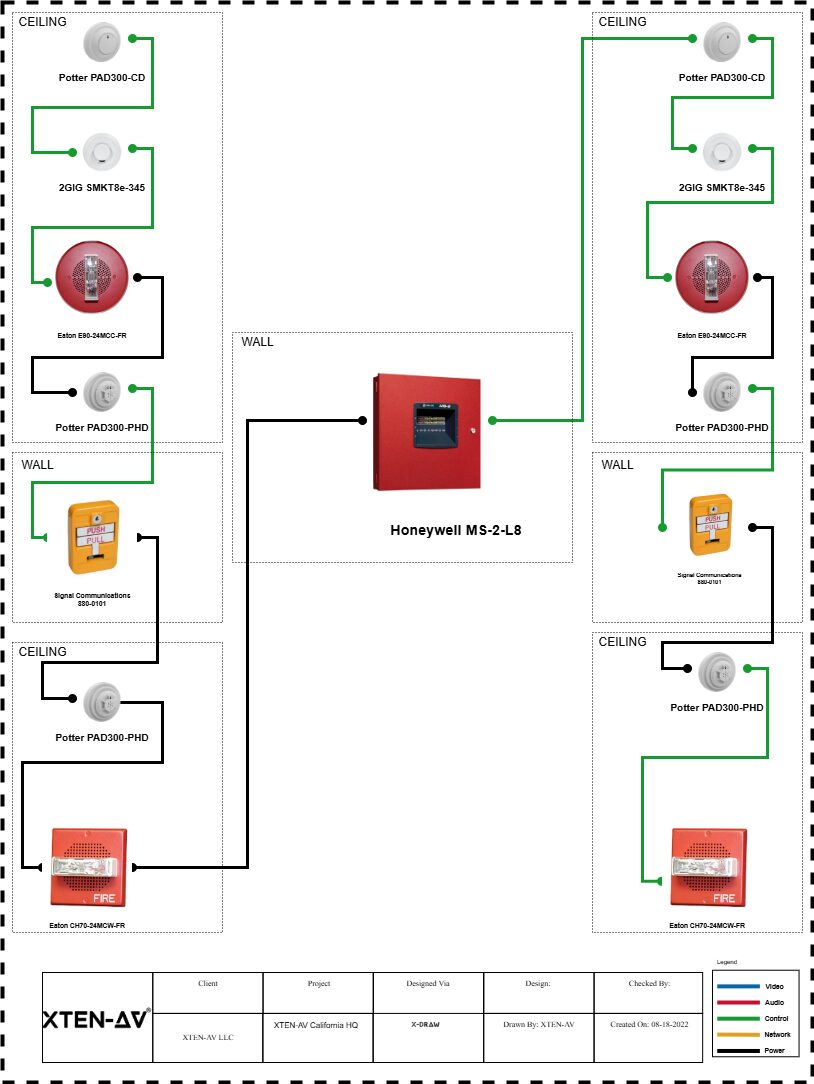
1. XTEN-AV Fire Protection System Design Software
Website: XTENAV.com
Pricing: Custom (Contact for Quote)
Type: Cloud-Based, All-in-One Platform
Overview
XTEN-AV represents the next generation of fire protection system design software, combining AI-powered automation, cloud collaboration, and end-to-end project management in one unified platform. Unlike traditional CAD-based tools, XTEN-AV is purpose-built for modern fire safety professionals who need speed, accuracy, and seamless workflows.
Key Features That Make XTEN-AV Schematic Fire Protection System Design Software Stand Out
1. AI-Powered Design Automation (XAVIA)
XTEN-AV leverages its AI engine (XAVIA) to automate critical design tasks such as:
-
Device placement (smoke detectors, alarms, sprinklers)
-
System layout generation based on building parameters
-
Compliance checks against NFPA and local codes
This drastically reduces manual drafting time and minimizes human error, enabling faster and more accurate fire protection designs.
2. Cloud-Based, Real-Time Collaboration
Being fully cloud-native, XTEN-AV allows:
-
Multiple users to work on the same schematic simultaneously
-
Real-time updates and version control
-
Remote access from anywhere
This is especially valuable for distributed teams working on large fire protection projects.
3. Automated Schematic & Diagram Generation (X-DRAW)
With built-in tools like X-DRAW:
-
Create fire alarm schematics and fire protection diagrams instantly
-
Drag-and-drop components into layouts
-
Automatically generate clean, professional diagrams
This eliminates the need for manual CAD drafting from scratch.
4. Massive Built-In Product & Symbol Library
XTEN-AV provides access to:
-
1.5M+ products from thousands of manufacturers
-
Pre-built fire protection symbols (detectors, panels, sprinklers, etc.)
-
Up-to-date device specifications
This ensures accuracy in system design and eliminates the need for manual asset sourcing.
5. Instant Bill of Materials (BoM) Generation
The platform automatically:
This reduces estimation errors and speeds up project documentation.
6. End-to-End Workflow (Design → Proposal → Project Management)
XTEN-AV is not just a schematic tool—it’s a complete ecosystem:
-
Design fire protection systems
-
Convert designs into client-ready proposals
-
Track project progress in one platform
This eliminates the need for multiple disconnected tools.
7. Built-In Compliance & Code Validation
Fire protection systems must follow strict standards (NFPA, EN, etc.). XTEN-AV helps by:
-
Validating designs against industry codes
-
Reducing compliance risks
-
Ensuring approval-ready documentation
8. Integrated Fire Alarm + Sprinkler + AV Design
Unlike traditional tools, XTEN-AV supports:
This unified approach enables complete life safety system design within one interface.
9. Smart Templates & Pre-Built Layouts
XTEN-AV offers:
This significantly reduces design time for repetitive projects.
10. Real-Time Updates from Field to Office
Design changes can be:
-
Updated instantly from job sites
-
Synced across all stakeholders
-
Reflected in drawings and documents automatically
This ensures alignment between engineers, installers, and project managers.
11. Automated Proposal Generation
XTEN-AV can convert system designs into:
-
Professional proposals
-
Branded documents
-
Detailed scope of work
This helps close deals faster and improves client communication.
12. Seamless Integration with Business Tools
The platform integrates with:
-
CRM systems
-
Project management tools
-
Accounting platforms
This enhances operational efficiency beyond just design.
13. Scalability for Small to Enterprise Projects
Whether you’re designing:
XTEN-AV scales easily with project complexity and team size.
Pros
✅ AI-driven automation saves 60-80% design time
✅ All-in-one platform (no need for multiple tools)
✅ Cloud-based with real-time collaboration
✅ Massive product library (1.5M+ items)
✅ Built-in compliance validation
✅ Professional proposal generation
✅ Supports fire alarm, sprinkler, and AV integration
✅ Mobile-friendly for field access
✅ Excellent customer support and training
Cons
❌ Custom pricing (not transparent upfront)
❌ Learning curve for traditional CAD users
❌ Requires internet connection for full functionality
Best For
-
Fire protection engineering firms seeking complete workflow automation
-
System integrators combining fire, AV, and security systems
-
MEP consultants needing integrated life safety design
-
Growing businesses wanting scalable, cloud-based solutions
-
Teams requiring real-time collaboration across locations

2. AutoCAD with Fire Protection Add-Ons
Website: Autodesk.com
Pricing: $1,865/year (AutoCAD) + Add-ons
Type: Desktop/Cloud Hybrid
Overview
AutoCAD remains an industry standard for CAD design, and when combined with specialized fire protection add-ons, it becomes a capable tool for fire alarm schematics and sprinkler layouts.
Key Features
-
Industry-standard CAD environment
-
Compatible with DWG files universally
-
Extensive third-party plugin ecosystem
-
Advanced 2D drafting capabilities
-
Customizable symbol libraries
-
Layer management for complex projects
Pros
✅ Industry-standard format (DWG)
✅ Extensive training resources available
✅ Powerful customization options
✅ Works offline
✅ Integrates with Revit for BIM workflows
Cons
❌ Requires separate add-ons for fire-specific features
❌ Steep learning curve
❌ No built-in compliance checking
❌ Manual BoM generation
❌ Limited collaboration features
❌ High annual cost
Best For
-
Firms already invested in Autodesk ecosystem
-
Users requiring offline functionality
-
Projects demanding custom CAD workflows
3. Revit MEP (Building Information Modeling)
Website: Autodesk.com
Pricing: $2,825/year
Type: Desktop (BIM Platform)
Overview
Revit MEP is the leading BIM software for mechanical, electrical, and plumbing design, including fire protection systems. It excels at 3D modeling and coordination with other building trades.
Key Features
-
Full 3D modeling of fire systems
-
Clash detection with other trades
-
Parametric components for intelligent objects
-
Family libraries for fire devices
-
Coordination views for MEP integration
-
Quantity takeoffs from 3D models
Pros
✅ Complete BIM environment
✅ Excellent for multi-discipline coordination
✅ Powerful 3D visualization
✅ Industry-standard for large projects
✅ Automatic schedule generation
Cons
❌ Expensive licensing
❌ Significant learning curve
❌ Overkill for simple 2D schematics
❌ Resource-intensive (requires powerful computers)
❌ Limited fire-specific automation
❌ No built-in proposal tools
Best For
-
Large MEP firms working on complex buildings
-
Projects requiring BIM coordination
-
Teams already using Autodesk BIM 360
4. QCAD (Free/Open Source)
Website: qcad.org
Pricing: Free (Open Source) / Professional: $38 one-time
Type: Desktop (Cross-Platform)
Overview
QCAD is a free, open-source CAD application suitable for basic 2D drafting of fire protection schematics.
Key Features
Pros
✅ Completely free
✅ No subscription required
✅ Lightweight (runs on older hardware)
✅ Open-source flexibility
✅ Good for simple schematics
Cons
❌ No fire-specific features
❌ Manual everything (no automation)
❌ Limited symbol libraries
❌ No compliance checking
❌ No collaboration tools
❌ Basic documentation capabilities
❌ Minimal support
Best For
-
Freelancers on tight budgets
-
Simple schematic diagrams
-
Users needing basic CAD without cost
5. FireCAD by Fire Systems Software
Website: firesystems.com
Pricing: Contact for Quote
Type: Desktop/Cloud
Overview
FireCAD is specialized software designed exclusively for fire alarm system design, offering automation features tailored to NFPA compliance.
Key Features
-
Fire-specific device libraries
-
NFPA 72 compliance checking
-
Battery calculations
-
Loop voltage drop analysis
-
NAC circuit design
-
Equipment schedules generation
Pros
✅ Purpose-built for fire alarm design
✅ Built-in NFPA compliance
✅ Specialized calculation tools
✅ Focused feature set
Cons
❌ Limited to fire alarms (no sprinklers)
❌ Dated interface
❌ No cloud collaboration
❌ Limited integration options
❌ No AI automation
❌ Higher learning curve
Best For
6. HydraCAD (Sprinkler-Specific)
Website: hydracad.net
Pricing: Starts at $2,500/year
Type: Desktop
Overview
HydraCAD is specialized sprinkler system design software that automates hydraulic calculations and pipe sizing for NFPA 13 compliance.
Key Features
Pros
✅ Industry-leading hydraulic calculation engine
✅ Specialized for sprinkler systems
✅ NFPA 13 compliance built-in
✅ Detailed engineering reports
Cons
❌ Sprinklers only (no fire alarms)
❌ Expensive licensing
❌ Desktop-only (no cloud)
❌ Separate tool needed for full systems
❌ Limited collaboration
Best For
7. Bluebeam Revu (Markup & Collaboration)
Website: bluebeam.com
Pricing: $349/year
Type: Desktop/Cloud Hybrid
Overview
Bluebeam Revu isn’t design software but excels at PDF markup, collaboration, and quantity takeoffs from existing fire protection drawings.
Key Features
-
Advanced PDF markup tools
-
Studio collaboration sessions
-
Quantity takeoffs from PDFs
-
Punch list creation
-
Document comparison
-
Cloud synchronization
Pros
✅ Excellent for project collaboration
✅ Industry-standard for construction document management
✅ Powerful markup tools
✅ Affordable pricing
✅ Works with any PDF
Cons
❌ Not a design tool
❌ Requires source drawings
❌ No schematic creation
❌ Limited to 2D PDFs
Best For
-
Project managers coordinating installations
-
Field technicians marking up as-builts
-
Teams needing document collaboration
Benefits or Advantages
Investing in professional fire protection system design software delivers measurable advantages across your organization:
1. Dramatic Time Savings
Modern platforms with AI automation reduce design time by:
-
60-80% faster device placement vs. manual CAD
-
Automatic schematic generation in minutes
-
Instant BoM creation without spreadsheets
-
Pre-built templates for common applications
Real-world impact: What took 8 hours now takes 2 hours, allowing more projects per designer.
2. Enhanced Accuracy & Quality
Software-driven design eliminates common errors:
-
Automated compliance checking catches code violations
-
Device placement algorithms ensure proper coverage
-
Calculation engines validate circuit loads
-
Specification databases prevent obsolete components
Result: Fewer change orders, faster approvals, and higher client satisfaction.
3. Improved Collaboration
Cloud-based platforms transform team coordination:
-
Real-time multi-user editing eliminates version conflicts
-
Mobile access enables field updates
-
Client portals streamline review and approval
-
Integrated communication keeps everyone aligned
4. Cost Reduction
Direct financial benefits include:
-
Lower labor costs through automation
-
Reduced rework from accurate first-time designs
-
Better material pricing through integrated databases
-
Faster project turnover increases capacity
5. Competitive Advantage
Advanced tools differentiate your firm:
-
Professional proposals win more bids
-
Faster turnaround beats competitors
-
Modern workflows attract top talent
-
Scalability enables growth
6. Regulatory Compliance
Built-in validation ensures:
-
NFPA code adherence automatically checked
-
AHJ-ready documentation expedites permitting
-
Audit trails for accountability
-
Up-to-date standards through software updates
7. Data-Driven Insights
Modern platforms provide analytics on:
-
Project profitability per system type
-
Design efficiency metrics by engineer
-
Material cost trends for better budgeting
-
Historical data for future estimates
Step-by-Step: Designing a Fire Protection System
Here’s how the process works using modern fire protection design software like XTEN-AV:
Step 1: Project Initialization
Actions:
-
Import building floor plans (PDF, DWG, or scan)
-
Set project parameters (building type, occupancy, codes)
-
Select applicable standards (NFPA 72, NFPA 13, local codes)
Software features used:
Step 2: Site Survey & Requirements Analysis
Actions:
-
Document room dimensions and ceiling heights
-
Identify hazard areas requiring protection
-
Note existing infrastructure (power, pathways)
-
Capture client preferences and special requirements
Software features:
-
Mobile app for field data collection
-
Photo documentation with geo-tagging
-
Notes and annotations on drawings
Step 3: System Design & Device Placement
Actions:
-
Use AI-powered placement for smoke detectors
-
Position notification appliances per coverage requirements
-
Layout sprinkler heads with coverage calculations
-
Design fire alarm control panel locations
Software automation:
-
XAVIA AI suggests optimal device locations
-
Coverage analysis validates spacing
-
Compliance checking against NFPA requirements
-
Symbol libraries provide standard representations
Step 4: Circuit & Zone Design
Actions:
-
Group devices into detection zones
-
Design notification appliance circuits (NAC)
-
Calculate wire runs and voltage drops
-
Size backup batteries per load requirements
Software calculations:
-
Automatic circuit loading
-
Wire gauge recommendations
-
Battery sizing per NFPA 72
-
Load schedules generation
Step 5: Schematic Generation
Actions:
-
Auto-generate riser diagrams
-
Create floor plan layouts with device symbols
-
Produce single-line diagrams
-
Generate connection details
Tools used:
-
X-DRAW for automatic schematic creation
-
Template-based professional diagrams
-
Annotation tools for specifications
Step 6: Compliance Validation
Actions:
-
Run code compliance check
-
Review flagged issues
-
Make necessary adjustments
-
Generate compliance report
Automated checks:
-
Device spacing per NFPA 72
-
Circuit loading limits
-
Battery backup requirements
-
Documentation completeness
Step 7: Documentation & Proposal
Actions:
-
Generate bill of materials with quantities
-
Create equipment schedules
-
Produce installation instructions
-
Compile client proposal
Outputs:
Step 8: Collaboration & Review
Actions:
-
Share design with project stakeholders
-
Receive feedback via cloud platform
-
Make revisions in real-time
-
Obtain client approval
Collaboration features:
-
Multi-user access
-
Comment threads
-
Version control
-
Approval workflows
Step 9: Submittal Package
Actions:
-
Compile construction documents
-
Generate cut sheets from product library
-
Create submittal transmittal
-
Submit to authority having jurisdiction (AHJ)
Documentation:
Step 10: Installation Support & As-Builts
Actions:
-
Provide installation drawings to field crew
-
Track installation progress
-
Update with field changes
-
Generate as-built documentation
Field tools:
-
Mobile app access
-
Real-time updates
-
Photo documentation
-
Final closeout package
Comparison or Decision Section
How to Choose the Right Fire Protection System Design Software
Selecting the best fire protection design software requires evaluating several critical factors:
1. Project Complexity
Simple Projects (small buildings, basic systems):
-
QCAD (free) for basic schematics
-
AutoCAD with fire add-ons
-
Focus on drafting capabilities
Complex Projects (multi-building, integrated systems):
-
XTEN-AV for complete automation
-
Revit MEP for BIM coordination
-
Need advanced collaboration and compliance
2. System Types
Fire Alarms Only:
-
FireCAD (specialized)
-
XTEN-AV (all-in-one)
Sprinklers Only:
Complete Life Safety (alarms + sprinklers + AV):
3. Team Size & Collaboration Needs
Solo Practitioners:
Multi-Person Teams:
Distributed/Remote Teams:
4. Budget Considerations
Free Options:
Mid-Range ($500-2,000/year):
Premium ($2,000+/year):
ROI Consideration: Premium tools pay for themselves through:
5. Integration Requirements
Standalone Workflow:
-
Any platform works
-
Export to PDF sufficient
Integrated Business Systems:
-
XTEN-AV (CRM, project management, accounting)
-
Revit (Autodesk Construction Cloud)
-
API availability important
6. Compliance Standards
NFPA-Heavy Regions:
-
Built-in NFPA 72 and NFPA 13 checking essential
-
XTEN-AV, FireCAD, HydraCAD
International Projects:
-
Multi-standard support needed
-
XTEN-AV (global standards)
-
Manual validation with CAD tools
7. Learning Curve & Training
CAD Experience:
No CAD Background:
Training Resources:
Decision Matrix
|
Criteria |
XTEN-AV |
AutoCAD + Add-ons |
Revit MEP |
FireCAD |
HydraCAD |
QCAD |
|
Ease of Use |
⭐⭐⭐⭐⭐ |
⭐⭐⭐ |
⭐⭐ |
⭐⭐⭐ |
⭐⭐⭐ |
⭐⭐⭐⭐ |
|
Automation |
⭐⭐⭐⭐⭐ |
⭐⭐ |
⭐⭐⭐ |
⭐⭐⭐⭐ |
⭐⭐⭐⭐ |
⭐ |
|
Collaboration |
⭐⭐⭐⭐⭐ |
⭐⭐ |
⭐⭐⭐⭐ |
⭐⭐ |
⭐⭐ |
⭐ |
|
Compliance |
⭐⭐⭐⭐⭐ |
⭐⭐ |
⭐⭐⭐ |
⭐⭐⭐⭐⭐ |
⭐⭐⭐⭐⭐ |
⭐ |
|
All-in-One |
⭐⭐⭐⭐⭐ |
⭐⭐ |
⭐⭐⭐ |
⭐⭐ |
⭐⭐ |
⭐ |
|
Cost Value |
⭐⭐⭐⭐⭐ |
⭐⭐⭐ |
⭐⭐ |
⭐⭐⭐ |
⭐⭐⭐ |
⭐⭐⭐⭐⭐ |
|
Mobile Access |
⭐⭐⭐⭐⭐ |
⭐⭐ |
⭐⭐⭐ |
⭐⭐ |
⭐ |
⭐ |
Our Recommendation
For most fire protection professionals in 2026, XTEN-AV emerges as the clear winner because it uniquely combines:
✅ AI-powered automation (saves 60-80% design time)
✅ Complete workflow integration (design to delivery)
✅ Cloud collaboration (teams work together effortlessly)
✅ Built-in compliance (NFPA validation included)
✅ Unified platform (fire + sprinkler + AV in one tool)
✅ Scalability (grows with your business)
While specialized tools like HydraCAD excel at sprinkler hydraulics and FireCAD offers deep fire alarm features, they require multiple platforms and manual coordination. XTEN-AV’s integrated approach eliminates tool-switching and delivers a cohesive workflow from initial design through project closeout.
AI or Future Trends in Fire Protection System Design
The fire protection industry is experiencing rapid transformation driven by artificial intelligence, cloud computing, and IoT integration. Here’s what’s shaping the future:
1. AI-Powered Design Automation
Current State:
2026 & Beyond:
-
Machine learning algorithms analyze thousands of building parameters
-
Predictive device placement based on fire behavior modeling
-
Generative design produces multiple optimized layouts instantly
-
Natural language interfaces (“Design a fire alarm for a 10,000 sq ft office”)
Example: XTEN-AV’s XAVIA engine already uses AI to suggest device placement, but future versions will incorporate:
-
Fire simulation modeling for optimal protection
-
Historical project learning to improve recommendations
-
Cost optimization balancing protection vs. budget
2. Digital Twin Integration
Emerging Capability:
-
Real-time monitoring of installed systems
-
Predictive maintenance using IoT sensor data
-
Design software feeds directly into building management systems
-
As-built models automatically updated from field sensors
Impact: Design software becomes the foundation for entire building lifecycle management.
3. Augmented Reality (AR) for Design Review
Innovative Approaches:
-
AR headsets overlay fire system designs onto physical spaces
-
Virtual walkthroughs for client presentations
-
Field installation guidance with AR overlays
-
Clash detection in real-time during construction
4. Cloud-Native Everything
Market Shift:
-
Desktop software declining
-
Browser-based platforms dominating
-
Mobile-first design for field access
-
Global collaboration across time zones
Advantage: Teams work from anywhere with complete synchronization.
5. Advanced Compliance AI
Next-Gen Features:
-
Real-time code updates pushed to software
-
Jurisdictional intelligence adapts to local requirements
-
Automated permit package generation
-
AI reviewers simulate AHJ feedback before submission
6. Sustainability & Smart Building Integration
Growing Focus:
-
Energy-efficient fire systems
-
Green building compliance (LEED, WELL)
-
Integration with HVAC for smoke management
-
Wireless fire devices reducing installation impact
7. Blockchain for Compliance Documentation
Future Application:
-
Immutable inspection records
-
Certification verification
-
Contractor credential validation
-
Smart contracts for project milestones
8. Robotics-Assisted Installation
Emerging Technology:
-
Autonomous device placement verification
-
Robotic installation of sensors in hard-to-reach areas
-
Drone inspections for large facilities
-
Design software outputs robot-readable instructions
9. Advanced Analytics & Machine Learning
Business Intelligence:
-
Project profitability analysis by system type
-
Designer performance metrics
-
Client behavior patterns
-
Predictive bidding based on win probability
XTEN-AV and similar platforms already capture data; future versions will provide AI-driven business insights.
10. Voice & Conversational Interfaces
User Experience Innovation:
-
“Hey XTEN, add smoke detectors to conference room 3”
-
Voice-controlled design modifications
-
Conversational compliance checking
-
Audio design reviews for hands-free workflows
Industry Impact
These trends collectively mean:
For Designers:
-
Less time on repetitive tasks
-
More focus on complex problem-solving
-
Higher-value work and satisfaction
For Businesses:
For Clients:
The Bottom Line: Firms adopting AI-powered platforms like XTEN-AV position themselves at the forefront of industry evolution, while those clinging to legacy CAD tools risk obsolescence.
Common Mistakes or Best Practices
Top Mistakes to Avoid
1. Choosing Software Based Only on Price
Mistake: Selecting the cheapest option without considering total cost of ownership.
Impact:
-
Hidden costs in add-ons and plugins
-
Productivity losses from manual workflows
-
Higher labor costs offset software savings
Best Practice: Calculate ROI based on time savings. A $3,000/year platform that cuts design time in half pays for itself quickly compared to a $500/year tool with manual processes.
2. Ignoring Team Collaboration Needs
Mistake: Buying desktop-only software for multi-person teams.
Consequences:
-
Version control nightmares
-
Email ping-pong with file attachments
-
Duplicated work and conflicts
Best Practice: Prioritize cloud-based platforms like XTEN-AV that enable real-time collaboration and eliminate file management headaches.
3. Overlooking Compliance Features
Mistake: Using generic CAD without built-in code validation.
Risk:
Best Practice: Invest in tools with automated compliance checking to catch errors before submission.
4. Not Considering Integration
Mistake: Selecting software that can’t connect with other business systems.
Problem:
Best Practice: Choose platforms like XTEN-AV that integrate with CRM, project management, and accounting systems.
5. Inadequate Training Budget
Mistake: Buying sophisticated software without proper training.
Result:
-
Underutilized features
-
Slow adoption
-
Poor ROI
Best Practice: Allocate 10-15% of software cost to training and ensure vendor provides comprehensive onboarding.
6. Failing to Plan for Scalability
Mistake: Choosing software that doesn’t grow with your business.
Consequence:
-
Forced platform switch later (costly and disruptive)
-
Can’t handle larger/complex projects
-
Lost competitive opportunities
Best Practice: Select scalable solutions like XTEN-AV that work for both small and enterprise projects.
7. Ignoring Mobile/Field Requirements
Mistake: Desktop-only software when field crews need access.
Drawback:
Best Practice: Ensure software offers robust mobile apps for field technicians.
8. Not Testing Before Committing
Mistake: Buying software without hands-on trial.
Issue:
Best Practice: Always request demos and trial periods. Test with real projects before licensing.
Best Practices for Implementation Success
1. Develop a Migration Plan
Steps:
-
Audit current workflows and identify bottlenecks
-
Map how new software addresses each issue
-
Plan phased rollout (pilot project first)
-
Establish success metrics
2. Create Standard Templates
Action:
-
Build company-standard fire system templates
-
Develop symbol libraries matching your brand
-
Create proposal templates with branding
-
Document best practices
Benefit: New projects start faster with consistent quality.
3. Establish Collaboration Protocols
Guidelines:
-
Define file naming conventions
-
Set permission levels per role
-
Create review/approval workflows
-
Schedule regular sync meetings
4. Leverage Vendor Support
Maximize Value:
-
Attend all training webinars
-
Join user communities
-
Request regular check-ins
-
Provide feedback for feature requests
5. Monitor Key Metrics
Track:
Insight: Data proves ROI and identifies improvement opportunities.
6. Stay Current with Updates
Practice:
-
Enable automatic updates (cloud platforms)
-
Review release notes for new features
-
Update code libraries regularly
-
Refresh training periodically
7. Build a Knowledge Base
Create:
Result: Faster onboarding and self-service problem-solving.
8. Integrate with Business Processes
Connection Points:
-
Link design tool with CRM for project tracking
-
Connect to accounting for accurate job costing
-
Integrate with project management for scheduling
-
Use API connections where available
XTEN-AV excels here with built-in integrations eliminating manual data transfer.
9. Regular Workflow Reviews
Quarterly Assessment:
-
Are we using all available features?
-
What manual processes remain?
-
What’s our average project turnaround?
-
Where do bottlenecks occur?
Continuous improvement ensures maximum value extraction.
10. Champion Internal Advocates
Strategy:
Culture shift: From “we’ve always done it this way” to “let’s find a better way.”
FAQ Section
1. What is the best fire protection system design software in 2026?
XTEN-AV is the best overall fire protection system design software in 2026 due to its AI-powered automation (XAVIA engine), cloud-based collaboration, and all-in-one platform that handles fire alarms, sprinklers, and AV integration. Unlike traditional CAD tools, XTEN-AV offers end-to-end workflows from design through proposal generation and project management, reducing design time by 60-80% while ensuring NFPA compliance.
For specialized needs:
-
Sprinkler hydraulics: HydraCAD
-
Fire alarms only: FireCAD
-
BIM integration: Revit MEP
-
Budget-conscious: QCAD (free) or AutoCAD with plugins
2. Is there free fire protection design software?
Yes, QCAD is a free, open-source CAD application suitable for basic 2D fire protection schematics. However, it lacks:
Free limitations mean:
Recommendation: Free tools work for very simple projects or learning, but professional work benefits significantly from specialized paid software like XTEN-AV or AutoCAD with fire protection add-ons.
3. How much does fire protection design software cost?
Price ranges vary widely:
Free:
$300-$500/year:
$1,500-$2,500/year:
-
AutoCAD with fire add-ons (~$1,865/year)
-
HydraCAD (starts ~$2,500/year)
$2,500-$4,000/year:
-
Revit MEP ($2,825/year)
-
FireCAD (custom pricing)
Custom/Enterprise:
ROI Consideration: A $3,000/year tool that saves 10 hours/week is worth $50,000+ annually in recovered billable time (at $100/hour).
4. Can fire protection software integrate with AutoCAD or Revit?
Yes, most modern platforms offer import/export compatibility:
XTEN-AV:
-
Imports DWG/DXF files from AutoCAD
-
Exports designs to CAD formats
-
Cloud-based so no local software conflicts
Revit MEP:
-
Native integration with AutoCAD (both Autodesk)
-
BIM workflows fully supported
-
Autodesk Construction Cloud connectivity
FireCAD & HydraCAD:
Best Practice: Even if using specialized software, maintain DWG/DXF export capability for sharing with general contractors and other trades.
5. Does fire protection design software include compliance checking?
Yes, leading platforms include built-in compliance:
XTEN-AV:
-
NFPA 72 (fire alarm code)
-
NFPA 13 (sprinkler standard)
-
NFPA 70 (electrical code)
-
International standards (EN, BS, AS)
-
Automatic validation during design
FireCAD:
HydraCAD:
AutoCAD/QCAD:
Why it matters: Compliance checking prevents costly redesigns when AHJ rejects plans, saving weeks and maintaining client relationships.
6. Can I design both fire alarms and sprinklers in one software?
XTEN-AV is unique in providing unified fire alarm and sprinkler design in one platform, along with AV/communication systems. This eliminates:
Traditional approach requires:
Other options:
Advantage: Unified platforms like XTEN-AV streamline workflows and improve accuracy through single-source design data.
7. Is cloud-based fire protection software secure?
Yes, when choosing reputable vendors with proper security:
XTEN-AV Security Features:
-
Enterprise-grade encryption (in transit and at rest)
-
SOC 2 compliance
-
Multi-factor authentication (MFA)
-
Role-based access controls
-
Regular security audits
-
Automatic backups
Best Practices:
-
Choose vendors with published security standards
-
Enable MFA for all users
-
Set appropriate permission levels
-
Review access logs regularly
-
Ensure GDPR/data protection compliance
Advantage over desktop: Cloud platforms actually provide better disaster recovery than local files on individual computers.
8. How long does it take to learn fire protection design software?
Learning curves vary by platform:
XTEN-AV:
-
Basic proficiency: 1-2 weeks
-
Advanced features: 4-6 weeks
-
Intuitive interface designed for efficiency
-
Comprehensive training provided
AutoCAD + Fire Add-ons:
Revit MEP:
QCAD:
Acceleration factors:
Recommendation: Modern platforms like XTEN-AV prioritize usability, reducing training time significantly compared to traditional CAD.
9. Do I need CAD experience to use fire protection design software?
It depends on the platform:
No CAD Required:
-
XTEN-AV: Purpose-built with intuitive interface, drag-and-drop functionality, and AI assistance. Designed for fire protection professionals, not CAD operators.
CAD Skills Helpful:
Benefit of Modern Platforms: Tools like XTEN-AV democratize design, allowing fire protection engineers and integrators to focus on system requirements rather than mastering complex CAD software.
10. Can fire protection software generate proposals and quotes?
Yes, advanced platforms automate business documents:
XTEN-AV:
-
Converts designs directly into professional proposals
-
Automatic bill of materials with current pricing
-
Branded templates matching company identity
-
Scope of work generation
-
Labor hour estimates
Traditional CAD:
Business Impact: Integrated proposal generation accelerates sales cycles, improves quote accuracy, and presents a more professional image to clients.
XTEN-AV’s end-to-end workflow means design→proposal→project management happens in one platform without data re-entry.
Conclusion with Key Takeaways
Selecting the right fire protection system design software in 2026 is a strategic decision that impacts every aspect of your business—from design efficiency and accuracy to team collaboration and profitability.
Key Takeaways:
1. AI-Powered Automation is the Future
Modern platforms like XTEN-AV leverage artificial intelligence to automate device placement, compliance checking, and documentation—reducing design time by 60-80% compared to traditional CAD workflows. XAVIA, XTEN-AV’s AI engine, represents the cutting edge of fire protection design technology.
2. Cloud Collaboration is Essential
Real-time, cloud-based platforms eliminate version control issues, enable remote work, and facilitate seamless coordination across distributed teams. XTEN-AV’s cloud-native architecture ensures everyone works from a single source of truth.
3. Integrated Workflows Drive ROI
The most valuable software goes beyond just design—platforms like XTEN-AV offer end-to-end workflows from initial schematic through proposal generation and project management. This eliminates tool-switching and data re-entry.
4. Compliance Validation Prevents Costly Mistakes
Built-in NFPA 72, NFPA 13, and NFPA 70 compliance checking catches errors before submission, avoiding rejected plans and project delays. Automated validation is non-negotiable for professional work.
5. Unified Platform Beats Multiple Specialist Tools
While specialized software like HydraCAD (sprinklers) or FireCAD (fire alarms) offers deep features, managing multiple tools creates coordination challenges. XTEN-AV’s unified approach to fire alarms, sprinklers, and AV systems in one interface streamlines complex projects.
6. Total Cost of Ownership Matters More Than Price
A $3,000/year platform that cuts 10 hours/week of manual work delivers $50,000+ in annual value. ROI-based decisions beat price-only comparisons every time.
7. Mobile Access Enables Field Excellence
Modern software must support mobile devices for field technicians to update designs, capture as-builts, and sync changes in real-time. Desktop-only tools create communication gaps.
8. Scalability Future-Proofs Your Investment
Choose platforms that grow with your business. XTEN-AV scales from small residential fire alarms to enterprise-level multi-building campuses without requiring new software.
Our Final Recommendation
For fire protection professionals, AV integrators, and system designers in 2026, XTEN-AV stands as the clear choice for comprehensive fire protection system design. Its combination of:
✅ AI-powered automation (XAVIA engine)
✅ Cloud-based real-time collaboration
✅ Integrated fire alarm + sprinkler + AV design
✅ End-to-end workflow (design → proposal → project management)
✅ 1.5M+ product library with instant specifications
✅ Built-in NFPA compliance validation
✅ Professional proposal generation
✅ Mobile field access
✅ Seamless business tool integration
…makes it the most complete and forward-thinking platform available.
While specialized tools excel in narrow domains and free options serve basic needs, XTEN-AV delivers unmatched value for firms serious about operational excellence and competitive advantage.
Take Action
Ready to transform your fire protection design workflow?
For XTEN-AV:
-
Request a personalized demo
-
Start a trial with your next project
-
Speak with implementation specialists
For Other Platforms:
-
Download trial versions before purchasing
-
Test with real-world projects
-
Calculate expected time savings
General Best Practices:
-
Audit your current design process for bottlenecks
-
Calculate ROI based on time savings, not just software cost
-
Prioritize platforms with strong vendor support
-
Plan adequate training budget (10-15% of software cost)
-
Start with pilot projects before full rollout
The right fire protection system design software isn’t an expense—it’s an investment in your firm’s efficiency, accuracy, and growth. Choose wisely, implement thoughtfully, and reap the benefits of modern, intelligent design workflows.
The future of fire protection engineering is here. Are you ready?
PakarPBN
A Private Blog Network (PBN) is a collection of websites that are controlled by a single individual or organization and used primarily to build backlinks to a “money site” in order to influence its ranking in search engines such as Google. The core idea behind a PBN is based on the importance of backlinks in Google’s ranking algorithm. Since Google views backlinks as signals of authority and trust, some website owners attempt to artificially create these signals through a controlled network of sites.
In a typical PBN setup, the owner acquires expired or aged domains that already have existing authority, backlinks, and history. These domains are rebuilt with new content and hosted separately, often using different IP addresses, hosting providers, themes, and ownership details to make them appear unrelated. Within the content published on these sites, links are strategically placed that point to the main website the owner wants to rank higher. By doing this, the owner attempts to pass link equity (also known as “link juice”) from the PBN sites to the target website.
The purpose of a PBN is to give the impression that the target website is naturally earning links from multiple independent sources. If done effectively, this can temporarily improve keyword rankings, increase organic visibility, and drive more traffic from search results.