
August 31, 2026 at 3:50 pm,
No comments
This comprehensive comparison examines AVSnap and XTEN-AV to help AV integrators, system designers, and AV consultants make informed decisions about their design software investments.
The audiovisual integration industry continues to evolve rapidly, with AV integrators facing increasing pressure to deliver complex systems faster, more accurately, and with better documentation. Choosing the right AV design software can significantly impact project efficiency, documentation quality, and overall business scalability. As AV professionals evaluate their design workflows, many are searching for the best AVSnap alternatives that can meet modern integration demands.AVSnap has served the AV community as a capable system design and documentation tool for years, particularly excelling in system diagrams, cable routing, and rack layouts.
However, as projects become more complex and integration teams grow, many professionals are exploring alternatives that offer more automation, connectivity, and advanced capabilities. Understanding the best AVSnap alternatives available today is crucial for AV integrators looking to optimize their design workflows and stay competitive in an increasingly demanding market.This comprehensive comparison examines AVSnap and XTEN-AV to help AV integrators, system designers, and AV consultants make informed decisions about their design software investments. We’ll explore the strengths of each platform, analyze key features, and identify which solution best serves different integration scenarios.
Understanding AVSnap: Strengths and Limitations
What AVSnap Does Well
AVSnap has established itself as a straightforward AV design software solution that serves many system integrators effectively
The platform provides essential capabilities for creating AV system diagrams, equipment layouts, and basic documentation. For smaller AV integration firms or individual designers working on relatively straightforward projects, AVSnap offers an accessible entry point into professional AV schematic design.The software includes manufacturer libraries, allowing designers to access equipment symbols and specifications. Its cable routing capabilities help document signal paths, and the rack layout features enable basic equipment rack design. These core functionalities have made AVSnap a familiar tool within the AV integration community.
Where AVSnap Falls Short
Despite its capabilities, AVSnap presents limitations that become increasingly apparent as project complexity grows
The platform primarily functions as a drawing application rather than a fully integrated AV design workflow. This means designers often work with disconnected processes where schematics, bills of materials, product specifications, and project documentation exist in separate silos.For growing AV integration companies handling multiple projects simultaneously, this disconnected approach can create significant inefficiencies. Manual data entry across multiple platforms, version control challenges, and the repetitive nature of creating similar designs from scratch can consume valuable engineering time. Additionally, the lack of advanced automation features means designers spend considerable time on repetitive tasks that could potentially be streamlined.
Why AV Integrators Seek AVSnap Alternatives
The Need for Connected Workflows
Modern AV system design involves more than creating attractive diagrams. Professional AV integrators need tools that connect design, documentation, equipment selection, BOM generation, and project collaboration into a cohesive workflow
When these elements remain disconnected, every change requires manual updates across multiple documents, increasing the risk of errors and inconsistencies.AV consultants and system integrators working on commercial AV projects particularly feel this pain point. A typical project might involve creating signal flow diagrams, equipment layouts, rack elevations, floor plans, cable schedules, and bills of materials. If each document requires separate creation and manual synchronization, the administrative burden can become overwhelming.
Demand for Automation and AI
The AV integration industry increasingly recognizes that automation can significantly improve design efficiency
Repetitive tasks like equipment placement, connection routing, cable labeling, and documentation generation represent opportunities for automation. Forward-thinking integrators seek AV design software that leverages artificial intelligence and automation to reduce manual work while maintaining accuracy and professional standards.
Cloud-Based Collaboration Requirements
As AV integration teams become more distributed and projects involve multiple stakeholders across different locations, cloud-based AV design capabilities have become essential
Sales teams, designers, engineers, project managers, and installation technicians all need access to current project information. Traditional desktop-only software creates collaboration challenges and version control problems that can impact project execution.
Introducing XTEN-AV: A Modern AVSnap Alternative
What Makes XTEN-AV Different
XTEN-AV X-DRAW represents a fundamentally different approach to AV system design software Rather than functioning solely as a drawing application, XTEN-AV provides a comprehensive cloud-based AV design platform that connects schematic design, product data, documentation, and collaboration into a unified environment. This integrated approach addresses many limitations that drive AV integrators to search for AVSnap alternatives.
The platform combines traditional AV schematic design capabilities with modern technologies including artificial intelligence, cloud computing, and intelligent product databases. This combination enables workflows that go beyond manual drawing creation to include automated design assistance, intelligent equipment selection, and connected documentation.
The XTEN-AV Design Philosophy
XTEN-AV’s development centers on understanding actual AV integration workflows rather than adapting generic drawing software for AV applications
The platform incorporates concepts specific to audiovisual system design including signal paths, AV equipment ports, cable connections, rack planning, and AVIXA-oriented design standards. This purpose-built approach makes XTEN-AV particularly relevant for professional AV system integrators who need tools designed around their specific requirements.
Key Features That Make XTEN-AV Stand Out
1. AI-Powered AV Schematic Generation
One of the most significant differentiators positioning XTEN-AV as one of the best AVSnap alternatives is its AI-powered schematic generation capability
Traditional AV design requires designers to manually place every device, create every connection, and organize every element of a schematic from a blank canvas. This process, while providing complete control, involves substantial repetitive work.XTEN-AV’s Draw with AI feature changes this paradigm. Designers can add required equipment to their project and use AI assistance to generate an initial AV system schematic
The AI analyzes the equipment, understands typical signal flow patterns, and creates a starting point that designers can then review and refine. This doesn’t eliminate the designer’s role but rather accelerates the initial creation phase.
Why this matters for AV integrators: Conference rooms, huddle spaces, and training rooms often follow similar architectural patterns. Instead of manually recreating these patterns for every project, AI-assisted design allows integrators to generate initial schematics quickly and then customize them for specific requirements. For firms handling multiple similar projects, this capability can significantly improve design throughput.The platform also includes AI-powered connection checking that identifies potentially incorrect or questionable connections before drawings reach the installation phase
. This proactive validation helps catch design errors early when they’re easier and less expensive to correct.
2. Automated AV Drawings and Documentation
Professional AV documentation extends beyond single schematics to include multiple interconnected documents XTEN-AV X-DRAW supports comprehensive documentation including:
- Line schematics
- Signal flow diagrams
- Cable diagrams
- Rack elevation drawings
- Floor plans
- Equipment layouts
- Front elevations
- AV submittals
- Bill of Materials
The critical advantage lies in how these documents connect to underlying project data . Rather than maintaining separate isolated files, changes to equipment or system architecture can propagate through connected documentation. This reduces the manual maintenance burden that plagues disconnected workflows
Consider this scenario: An AV project contains 4 displays, 12 speakers, 3 amplifiers, 2 DSPs, 4 network switches, 6 transmitters, 6 receivers, and 2 control processors
. If the client requests changing one amplifier model, a disconnected workflow requires manually updating multiple drawings, equipment lists, cable schedules, and rack elevations. A connected workflow allows updating the equipment once, with changes flowing through related documentation automatically.
3. AV-Specific Product Library
Equipment selection consumes considerable time in AV system design XTEN-AV provides an extensive AV product database containing products from thousands of manufacturers with detailed information including:
- Manufacturer and model details
- Product specifications
- Physical dimensions
- Port configurations
- Product images
- Technical documentation
This comprehensive product library integrates directly into the design workflow . Rather than creating generic equipment symbols, designers can search for and select actual products they intend to specify. This creates drawings more closely aligned with the real systems being installed and reduces ambiguity during procurement and installation phases.
Why this represents a strong AVSnap alternative: The product database isn’t merely a symbol library—it becomes part of the broader design, BOM, and documentation ecosystem. Product specifications, dimensions, and port information flow from the database into schematics, rack layouts, and equipment lists automatically.
4. Design-to-BOM Synchronization
One of the most common pain points in AV integration involves maintaining consistency between system drawings and bills of materials . Traditional workflows often treat these as separate artifacts:
Traditional workflow:
Drawing → Manual equipment list → Manual BOM → Manual revisions
XTEN-AV connected workflow:
Products → Design → BOM → DocumentationWhen equipment changes occur, the project data updates rather than requiring designers to maintain completely separate records
. This synchronization helps prevent common problems including:
- Incorrect purchasing decisions
- Missing equipment discoveries during installation
- Installation delays from equipment mismatches
- Costly change orders
- Engineering confusion
- Project rework
For AV integrators, BOM accuracy directly impacts project profitability and client satisfaction. Keeping design and equipment data connected reduces risks associated with documentation inconsistencies.
5. Automated Cable Labeling and Styling
Cable documentation represents another area where AV projects can become complicated quickly Professional installations may involve hundreds of cable connections, each requiring clear identification for installation and future troubleshooting. XTEN-AV X-DRAW provides automatic cable labeling and styling, allowing designers to create cleaner and more consistent cable documentation without manually formatting every connection.
What professional cable documentation should communicate:
- Cable origin point
- Cable termination point
- Signal type carried
- Equipment connections
- Cable identification methodology
Clear cable labeling makes installation faster and troubleshooting considerably easier . For larger projects with hundreds of connections, automation can save substantial design time while improving documentation quality.
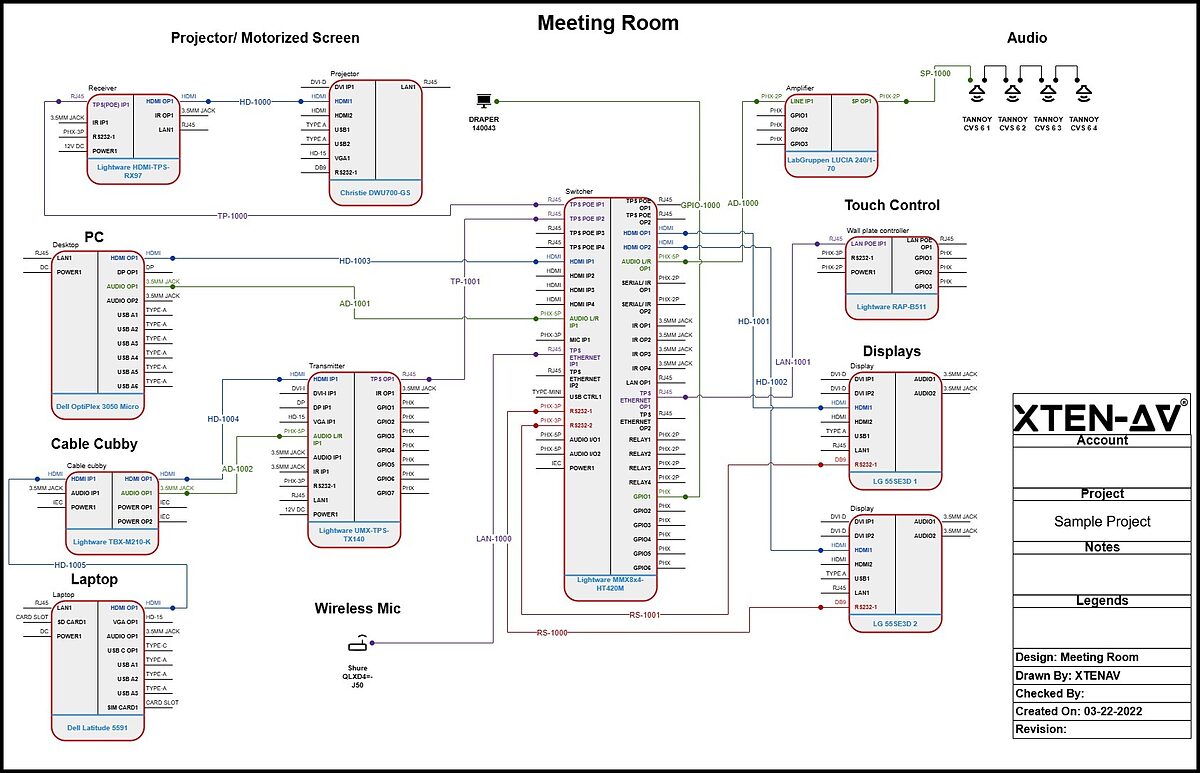
6. Signal Flow and Line Schematic Design
XTEN-AV X-DRAW specifically targets AV signal flow and schematic documentation .
Designers can visually represent how audio, video, network, control, and other signals move through systems.
For example:Audio path: Microphone → DSP → Amplifier → Speaker
Video path: Source → Switcher → Distribution → DisplayThese visual representations make complex AV architectures easier for engineers, installers, clients, and stakeholders to understand
Signal flow documentation serves multiple purposes beyond creating professional-looking drawings:
- Engineering review and validation
- Installation guidance
- System troubleshooting
- Commissioning procedures
- Client approvals
- Future system modifications
This focus on signal flow makes X-DRAW particularly relevant for professional audiovisual system design rather than general-purpose diagramming.
7. AV Floor Plan Design
AV projects require more than schematics—integrators must show where equipment physically installs
X-DRAW supports floor plan workflows where designers can upload existing architectural plans and incorporate AV equipment locations including:
- Display positions
- Projector mounting
- Speaker locations
- Microphone placement
- Camera positions
- Control panel locations
- Equipment rack locations
Existing AutoCAD or Visio floor plans can integrate into the workflow allowing designers to work with client-provided architectural documentation. A schematic explains how the system connects; a floor plan explains where the system installs. Having both within the same design workflow provides integrators with a more complete project view.
8. Rack Elevation Design
Professional AV system design requires detailed rack documentation X-DRAW allows designers to create rack elevation layouts and assign equipment to specific rack units, visualizing:
- Equipment placement and organization
- Rack unit allocation
- Device physical dimensions
- Equipment vertical spacing
- Rack infrastructure requirements
For complex AV installations, rack elevation drawings guide installers during equipment installation and assist engineers during system planning . Poor rack planning can result in insufficient space, ventilation problems, difficult service access, and cable management issues. Dedicated AV design workflow makes rack planning an integral part of system design rather than an afterthought.
9. Thermal and Ventilation Planning
Rack design extends beyond fitting equipment into available rack units High-powered AV equipment generates significant heat, particularly amplifiers, DSPs, network switches, video processors, matrix switchers, and control equipment. XTEN-AV’s rack planning capabilities help designers consider thermal and ventilation requirements during equipment placement planning.A rack that technically fits every device isn’t necessarily a properly engineered rack . Considering ventilation during the design phase helps avoid problems during installation and commissioning that could impact system reliability and longevity.
10. AV Design Templates
Reusable design templates can significantly improve productivity . Instead of beginning every project from scratch, integrators can create standardized designs for common environments:
- Conference rooms
- Boardrooms
- Training rooms
- Classrooms
- Huddle spaces
- Meeting rooms
- Digital signage systems
Many AV integrators repeatedly design similar systems . If an organization has a standard conference room design, engineers shouldn’t recreate the same architecture for every installation. Reusable templates allow teams to standardize:
- Equipment selection
- Signal flow architecture
- Cable infrastructure
- Drawing structure
- Documentation approach
This standardization improves both speed and consistency across projects, making XTEN-AV a compelling AVSnap alternative for AV integrators seeking to scale their operations.
11. Cloud-Based AV Design
XTEN-AV’s cloud-based architecture represents a fundamental difference from traditional desktop AV design software This approach particularly benefits teams where designers, engineers, project managers, sales teams, and other stakeholders need project access from different locations.Modern AV integration teams often include:
- Designers working remotely
- Engineers in different offices
- Project managers reviewing documentation
- Sales teams preparing proposals
- Installation teams at customer sites
Cloud-based environments keep project information accessible across organizations , reducing dependence on individual designers’ local files and improving information flow throughout project lifecycles.
12. Collaboration Across AV Teams
AV projects rarely involve only one person Typical project workflows include:Sales → Designer → Engineer → Project Manager → Installer → ClientWhen each person works with disconnected files, information easily becomes outdated XTEN-AV’s centralized approach enables teams to work around shared project information. Better collaboration reduces:
- Duplicate work
- Version confusion
- Manual file transfers
- Outdated drawings
- Communication gaps
For growing AV integration companies, this becomes increasingly important as project volume increases, making XTEN-AV one of the best AVSnap alternatives for collaborative environments.
13. DWG and DXF Workflow Support
Many AV integrators have existing CAD drawings and don’t want to completely abandon previous workflows X-DRAW supports importing CAD-related drawings including DWG/DXF formats, allowing designers to work with existing project information rather than rebuilding everything from scratch.Existing design information might include:
- Architectural plans
- CAD floor plans
- Previous AV drawings
- Client-provided layouts
- Historical project documentation
Being able to incorporate existing design information makes migration to new workflows easier , reducing barriers for firms considering switching from AVSnap or other AV design software.
14. AI-Powered Equipment Search
Finding appropriate AV products can consume considerable time when dealing with thousands of manufacturers and models . XTEN-AV’s Search Sense uses artificial intelligence to make equipment discovery more intelligent. Instead of relying exclusively on exact product name searches, the system helps users discover relevant equipment based on their requirements and context.Example scenario: An AV designer might know the requirement but not the exact model: “Need a 4K HDMI extender for a conference room” .The challenge isn’t simply finding a product—it’s identifying a suitable product for the actual system requirements. Intelligent search workflows make equipment selection faster and reduce time spent browsing through large product databases.
15. AVIXA-Oriented Design Standards
Professional AV drawings need to be understandable to more than just their creators . XTEN-AV’s design approach incorporates AVIXA-oriented drawing conventions and standards, helping designers produce more structured and professional AV documentation.
Standardized documentation benefits:
- AV engineers
- System integrators
- Installation teams
- AV consultants
- Project managers
- Clients
This becomes especially important when drawings transfer between different organizations during projects , ensuring consistent communication and reducing misunderstandings.
Why XTEN-AV Is One of the Best AVSnap Alternatives
One Platform Instead of Multiple Disconnected Tools
Perhaps the strongest argument for XTEN-AV as an AVSnap alternative is its integrated approach . Traditional workflows often require multiple tools:
- AV design → CAD/diagramming software
- BOM → Spreadsheet applications
- Proposals → Proposal software
- Documentation → Word/PDF tools
- Project information → Project management platforms
- Product information → Manufacturer websites/databases
XTEN-AV aims to bring these workflows into a connected AV design environment The biggest productivity problem isn’t always individual software capabilities—it’s the handoff between applications. Every handoff creates opportunities for:
- Duplicate data entry
- Errors and inconsistencies
- Project delays
- Version control problems
- Lost information
A connected AV workflow reduces these manual bridges, improving efficiency and accuracy.
Better Scalability for Growing AV Integrators
AVSnap can be attractive for users wanting straightforward AV design tools . However, as AV integration companies grow, requirements often become more complex. Growing integrators typically need:
- Standardized design templates
- Centralized project data
- Automated drawing generation
- Comprehensive product databases
- BOM synchronization
- Cloud collaboration capabilities
- AI-powered assistance
- Documentation automation
- Repeatable workflows
This is where XTEN-AV becomes particularly compelling . The question evolves from “Can I draw this AV system?” to “How much of my entire AV design workflow can I automate and connect?” That distinction becomes important when evaluating AVSnap alternatives for business growth.
Faster Design for Repeatable AV Projects
Many AV integration projects aren’t completely unique . Companies often repeatedly deploy similar:
- Conference rooms
- Huddle rooms
- Training rooms
- Classrooms
- Digital signage systems
- Boardrooms
With reusable templates and integrated product information, designers can start with existing architectures rather than building every project from zero . This allows companies to turn their best engineering practices into reusable design templates. Over time, this creates more standardized engineering processes across organizations.
Easier Design Review and Troubleshooting
Good AV schematics aren’t just construction documents—they become troubleshooting resources after installation . Clear schematics allow technicians to understand:Device → Connection → Signal path → DestinationThis makes identifying problem locations easier . AI-assisted connection checking adds another layer by helping identify potential connection problems during the design stage. The result: potential issues can be identified before installation rather than discovering them when installers are already on-site.
Designed Specifically for AV Professionals
The most important reason to consider XTEN-AV over generic diagramming platforms is that X-DRAW is designed around actual workflows of AV designers, consultants, engineers, and system integrators . It isn’t simply a generic drawing application with AV symbols added.The workflow is built around concepts such as:
- AV products and equipment
- Signal ports and connections
- Signal paths and routing
- Cable connections and documentation
- Bills of materials
- Rack elevations
- AV floor plans
- Equipment layouts
- AV-specific documentation
- System design methodologies
This makes it much more relevant to professional AV integration workflows , positioning XTEN-AV as one of the best AVSnap alternatives for serious AV professionals.
User Case Studies: Real-World Applications
Case Study 1: Mid-Size Corporate AV Integrator
Challenge: A 15-person AV integration firm specializing in corporate installations was using AVSnap for system design but struggling with project scalability. Their design team spent excessive time manually creating similar conference room designs and maintaining separate BOMs in spreadsheets. Version control issues frequently caused confusion between sales, engineering, and installation teams.
Solution: The firm transitioned to XTEN-AV X-DRAW to leverage cloud-based collaboration and design templates. They created standardized templates for their three most common conference room configurations (small huddle, medium conference, large boardroom).
Results: Design time for standard conference rooms decreased by approximately 60%. BOM accuracy improved significantly, reducing procurement errors. Cloud-based access allowed sales teams to review designs during client meetings, improving communication and reducing revision cycles. The firm reported being able to handle 40% more projects with the same engineering staff.
Case Study 2: Educational AV Consultant
Challenge: An AV consultant specializing in educational facilities was managing multiple university projects simultaneously. Each project involved dozens of classrooms with similar but not identical AV systems. Creating individual schematics for each space was time-consuming, and maintaining consistency across projects proved difficult.
Solution: The consultant adopted XTEN-AV and created a library of classroom templates based on room sizes and teaching modalities (lecture halls, active learning spaces, seminar rooms, distance learning rooms). AI-powered schematic generation helped quickly customize templates for specific requirements.
Results: The consultant reduced design time per classroom by approximately 50%, allowing them to take on larger projects. Template-based design improved consistency across installations, making installation and troubleshooting easier. The consultant reported that the AI connection checking caught several design errors that would have caused installation delays.
Case Study 3: Large Commercial Integration Firm
Challenge: A 50+ person integration firm with multiple office locations struggled with design collaboration and standardization. Different designers used different approaches, making project handoffs difficult. Remote designers had limited access to project files stored on office servers.
Solution: The firm implemented XTEN-AV as their standard design platform across all locations. They developed company-wide design standards and templates accessible to all designers through the cloud platform. Project managers gained visibility into active designs without requesting files from individual designers.
Results: Design standardization improved significantly, making it easier to move projects between designers when needed. Cloud-based access eliminated file transfer delays and version confusion. The firm reported improved project margins due to reduced design errors and faster project execution. Installation teams particularly appreciated the improved cable documentation quality.
Frequently Asked Questions About AVSnap Alternatives
1. What is the best AVSnap alternative for professional AV integrators?
XTEN-AV X-DRAW stands out as one of the best AVSnap alternatives for professional AV integrators seeking a modern, connected design workflow While AVSnap provides solid basic capabilities, XTEN-AV offers AI-powered design assistance, automated documentation, cloud-based collaboration, and integrated BOM management that address limitations many integrators experience with traditional design software. The best choice depends on your specific needs, but firms seeking to scale operations and improve efficiency often find XTEN-AV’s comprehensive approach more aligned with professional integration requirements.
2. Can XTEN-AV import existing AVSnap or CAD files?
Yes, XTEN-AV X-DRAW supports importing existing CAD-related drawings including DWG and DXF formats This allows AV integrators to work with existing project information, architectural plans, and previous designs rather than starting completely from scratch. This import capability makes transitioning from AVSnap or other AV design software more practical for firms with existing project libraries.
3. Is cloud-based AV design software secure for sensitive projects?
Cloud-based AV design platforms like XTEN-AV implement enterprise-grade security measures to protect project data For many organizations, cloud platforms actually provide better security than individual desktop computers, which may lack proper backup, access controls, and security updates. However, organizations with specific security requirements should evaluate any platform’s security features against their particular needs before adoption.
4. How does AI-powered schematic generation work in XTEN-AV?
XTEN-AV’s AI-powered schematic generation analyzes the equipment added to a project and uses artificial intelligence to create initial system schematics based on typical signal flow patterns and best practices Designers add required equipment, then use the Draw with AI feature to generate a starting point. The designer then reviews, refines, and customizes the generated schematic. This doesn’t replace the designer’s expertise but rather accelerates the initial creation phase, particularly for projects following common architectural patterns.
5. Can XTEN-AV handle large, complex AV projects?
Yes, XTEN-AV is specifically designed to scale from simple installations to large, complex commercial AV projects The platform’s cloud-based architecture, automated documentation capabilities, and connected workflow approach actually become more valuable as project complexity increases. Features like AI connection checking, automated BOM synchronization, and collaborative design capabilities particularly benefit larger projects where coordination and accuracy are critical.
6. What makes XTEN-AV different from generic drawing software like Visio?
XTEN-AV is purpose-built for AV system design rather than adapted from general diagramming software The platform incorporates AV-specific concepts including signal paths, equipment ports, cable connections, rack planning, and AVIXA-oriented standards. It includes an extensive AV product database, automated BOM generation, and AI-powered design assistance specifically relevant to audiovisual integration. Generic drawing software requires significant customization and lacks the integrated workflow capabilities that make XTEN-AV effective for professional AV integration.
7. Does XTEN-AV support collaboration between remote team members?
Yes, XTEN-AV’s cloud-based architecture specifically enables collaboration across distributed teams Multiple stakeholders including designers, engineers, project managers, and sales teams can access project information from different locations. This eliminates the file transfer and version control problems common with desktop-only software, making XTEN-AV particularly valuable for firms with multiple offices or remote team members.
8. How do design templates work in XTEN-AV?
XTEN-AV allows AV integrators to create reusable design templates for common installation types Once a firm develops a standard design for a conference room, classroom, or other common space, that design can be saved as a template. Future projects can start with the template and customize it for specific requirements rather than starting from scratch. This improves both design speed and consistency across projects, making it easier to standardize best practices across an organization.
Conclusion
Selecting the right AV design software significantly impacts integration efficiency, documentation quality, and business scalability. While AVSnap has served the AV community as a capable system design tool, many professional integrators find themselves seeking more comprehensive solutions as their businesses grow and project complexity increases.XTEN-AV X-DRAW represents a modern approach to AV system design that addresses many limitations driving integrators to search for AVSnap alternativesBy combining AI-powered design assistance, automated documentation, comprehensive product databases, cloud-based collaboration, and integrated BOM management into a connected workflow, XTEN-AV offers capabilities that extend beyond traditional drawing applications.The platform’s purpose-built focus on audiovisual integration workflows—incorporating signal flow design, cable documentation, rack planning, and AVIXA-oriented standards—makes it particularly relevant for professional system integrators, AV consultants, and design engineers. Features like reusable templates, AI-assisted schematic generation, and design-to-BOM synchronization address real productivity challenges facing modern integration firms.For AV integrators evaluating the best AVSnap alternatives, the decision ultimately depends on specific business needs, project types, team structure, and growth objectives.
However, firms seeking to improve design efficiency, enhance collaboration, reduce documentation errors, and scale their operations often find XTEN-AV’s comprehensive, connected approach better aligned with professional integration requirements than traditional design software.As the AV integration industry continues evolving toward more complex systems, distributed teams, and demanding client expectations, having design software that can grow with your business becomes increasingly important. XTEN-AV positions itself as more than just a drawing tool—it’s a complete AV design platform built specifically for the workflows, challenges, and opportunities facing today’s professional audiovisual integrators.Whether you’re a small integration firm looking to standardize your design process, a mid-size company seeking better collaboration tools, or a large enterprise needing to scale design operations across multiple locations, evaluating modern AVSnap alternatives like XTEN-AV can help determine if your current tools adequately support your business objectives or if a more comprehensive platform could better serve your needs.
Leave a reply
PakarPBN
A Private Blog Network (PBN) is a collection of websites that are controlled by a single individual or organization and used primarily to build backlinks to a “money site” in order to influence its ranking in search engines such as Google. The core idea behind a PBN is based on the importance of backlinks in Google’s ranking algorithm. Since Google views backlinks as signals of authority and trust, some website owners attempt to artificially create these signals through a controlled network of sites.
In a typical PBN setup, the owner acquires expired or aged domains that already have existing authority, backlinks, and history. These domains are rebuilt with new content and hosted separately, often using different IP addresses, hosting providers, themes, and ownership details to make them appear unrelated. Within the content published on these sites, links are strategically placed that point to the main website the owner wants to rank higher. By doing this, the owner attempts to pass link equity (also known as “link juice”) from the PBN sites to the target website.
The purpose of a PBN is to give the impression that the target website is naturally earning links from multiple independent sources. If done effectively, this can temporarily improve keyword rankings, increase organic visibility, and drive more traffic from search results.