
June 12, 2026 at 5:01 pm,
No comments
Selecting the right equipment enclosure is one of the most critical decisions AV system integrators, consultants, and installation teams face when designing audio-visual systems for corporate, education, hospitality, healthcare, and government environments. The choice between a wall mounted Audio Visual (AV) rack and a floor standing AV rack directly impacts equipment accessibility, cable management, thermal performance, installation costs, space utilization, and long term system maintainability.
Wall mounted racks offer space efficient solutions for environments with limited floor space, providing secure, elevated equipment housing that integrates cleanly into architectural finishes. Floor standing racks, by contrast, deliver greater equipment capacity, superior cooling performance, and easier service access for complex, high density AV installations. Each configuration presents distinct advantages and constraints that must be evaluated against project specific requirements, including room dimensions, equipment load, ventilation needs, budget limitations, and future expansion plans.
Choosing the best software to design a wall mounted Audio Visual (AV) rack or any rack configuration has become essential for modern AV professionals. Purpose built design platforms like XTEN-AV X-DRAW enable integrators to create accurate rack elevation diagrams, generate synchronized bills of materials (BOMs), automate cable schedules, and produce installation ready documentation that reduces errors, accelerates project timelines, and improves collaboration across distributed teams. Without integrated design tools, teams often struggle with disconnected workflows, version control issues, and documentation inconsistencies that delay installations and increase project costs.
This comprehensive guide examines the key differences between wall mounted and floor standing AV racks, explores critical selection factors, and demonstrates how XTEN-AV X-DRAW simplifies rack planning, equipment selection, and documentation for both configurations. Whether you’re designing a single conference room AV system or coordinating enterprise wide AV infrastructure, understanding these rack types and leveraging the right design software ensures optimal equipment performance, installation efficiency, and client satisfaction.
Key Takeaways
-
Wall mounted AV racks are ideal for space constrained environments such as huddle rooms, classrooms, retail spaces, and small conference rooms, offering secure, elevated equipment housing with minimal floor space impact.
-
Floor standing AV racks provide greater equipment capacity, thermal management, and service accessibility, making them suitable for data centers, broadcast facilities, control rooms, and large scale AV installations.
-
Key selection factors include available space, equipment quantity, cooling requirements, service access needs, budget constraints, future expansion plans, and aesthetic considerations.
-
XTEN-AV X-DRAW is the best software to design a wall mounted Audio Visual (AV) rack and floor standing configurations, offering integrated tools for rack elevation diagrams, U space allocation, cable scheduling, BOM generation, and cloud based collaboration.
-
Wall mounted racks typically range from 6U to 18U in height and are limited by wall mounting capacity, internal depth, and ventilation constraints.
-
Floor standing racks commonly range from 24U to 48U (or larger), providing greater flexibility for high density equipment, active cooling systems, and future upgrades.
-
Proper rack selection requires evaluating equipment dimensions, weight capacity, cable entry points, power distribution, and environmental conditions before finalizing the design.
-
Common mistakes include underestimating equipment depth, ignoring thermal management, neglecting service access, and failing to plan for future expansion.
-
Emerging trends include AI assisted rack optimization, augmented reality (AR) installation guides, IoT enabled monitoring, and building information modeling (BIM) integration.
What Is a Wall Mounted AV Rack?
Definition and Overview
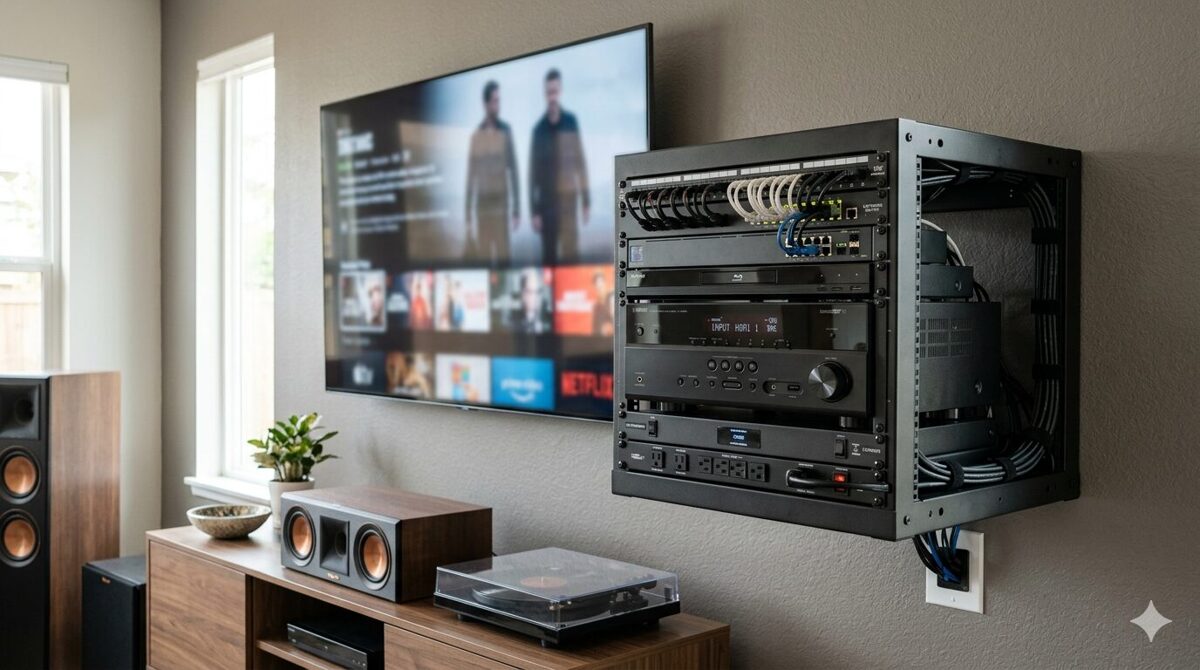
A wall mounted AV rack (also called a wall mount cabinet, swing out rack, or wall mount enclosure) is a compact, vertically oriented equipment housing designed to be attached directly to a wall surface using mounting brackets, wall studs, or structural supports. These racks provide secure storage for audio visual equipment including video switchers, control processors, network switches, digital signal processors (DSPs), amplifiers, patch panels, power distribution units (PDUs), and cable management accessories in environments where floor space is limited or where elevated equipment placement offers operational advantages.
Wall mounted racks are typically shallow, ranging from 12 to 24 inches in internal depth, and available in standardized heights measured in rack units (U or RU), with common sizes including 6U, 9U, 12U, 15U, and 18U. Each rack unit represents 1.75 inches of vertical space, allowing designers to calculate equipment capacity based on the combined U height of all rack mounted devices.
Key Characteristics of Wall Mounted AV Racks
-
Space efficiency: Minimal floor space footprint, ideal for small rooms or crowded environments
-
Elevated positioning: Equipment mounted at accessible heights for service and operation
-
Enclosed design: Lockable doors provide security and dust protection
-
Limited capacity: Smaller equipment capacity compared to floor standing alternatives
-
Shallow depth: Restricted internal depth limits compatibility with deep equipment
-
Ventilation constraints: Compact enclosures require careful thermal management
-
Aesthetic integration: Enclosed designs blend into architectural finishes
Common Applications for Wall Mounted AV Racks
Wall mounted AV racks are frequently deployed in:
-
Corporate huddle rooms and small conference rooms
-
Classrooms, training rooms, and lecture halls
-
Retail stores and digital signage installations
-
Hotel guest rooms and meeting spaces
-
Healthcare patient rooms and telemedicine suites
-
Residential home theaters and media rooms
-
Security control rooms with limited floor space
What Is a Floor Standing AV Rack?
Definition and Overview
A floor standing AV rack (also called a server rack, equipment rack, relay rack, or cabinet rack) is a freestanding, vertically oriented equipment enclosure that sits directly on the floor, providing substantial capacity for housing audio visual equipment, network infrastructure, broadcast systems, control systems, and power distribution in high density installations. Unlike wall mounted alternatives, floor standing racks do not require wall attachment, offering greater flexibility in equipment placement, capacity, and service access.
Floor standing racks are available in a wide range of sizes, commonly ranging from 24U to 48U in height (though larger configurations exist), with internal depths typically between 24 and 36 inches to accommodate deep equipment and rear mounted cable management systems. These racks often feature adjustable mounting rails, removable side panels, front and rear doors, integrated cable management accessories, and active cooling systems to support high density equipment loads.
Key Characteristics of Floor Standing AV Racks
-
High equipment capacity: Accommodates significantly more devices than wall mounted alternatives
-
Greater internal depth: Supports deep equipment and extensive cable management systems
-
Superior thermal management: Larger enclosures facilitate passive airflow and active cooling
-
Enhanced service access: Front and rear doors, removable panels, and open frame designs simplify maintenance
-
Flexible placement: Freestanding design allows positioning anywhere in the room
-
Scalability: Easier to expand or reconfigure as equipment needs evolve
-
Heavier construction: Robust frames support greater equipment weight
Common Applications for Floor Standing AV Racks
Floor standing AV racks are typically used in:
-
Data centers and network operations centers (NOCs)
-
Broadcast studios and production facilities
-
Large conference rooms and auditoriums
-
Command and control centers
-
Entertainment venues and live event production
-
Educational technology labs and research facilities
-
Government and military installations
What Is XTEN-AV?
Overview of XTEN-AV
XTEN-AV is a cloud based AV system design platform specifically developed for audio visual integrators, consultants, system designers, and project managers who need to plan, document, and visualize complex AV installations. The platform provides a unified environment for creating rack elevation diagrams, selecting equipment from comprehensive product libraries, generating cable schedules, producing bills of materials (BOMs), designing signal flow diagrams, and sharing project documentation with distributed teams.
Unlike generic CAD software, spreadsheet based workflows, or disconnected design tools, XTEN-AV is purpose built for the AV industry, offering features tailored to the unique requirements of commercial AV projects, including equipment compatibility verification, automated cable labeling, U space allocation, and real time collaboration.
XTEN-AV X-DRAW: The Core Design Module
XTEN-AV X-DRAW is the platform’s primary design module, enabling users to:
-
Create accurate rack elevation diagrams for both wall mounted and floor standing racks
-
Select equipment from a library of over 1.5 million products from more than 5,200 AV brands
-
Organize devices by U space allocation to verify rack capacity
-
Generate automated cable schedules with source, destination, cable type, and labeling information
-
Produce signal flow diagrams and line schematics showing device interconnections
-
Export bills of materials (BOMs) directly from the completed design
-
Upload floor plans to visualize rack placement within building layouts
-
Share cloud based project files for real time collaboration across teams
Why XTEN-AV X-DRAW Is the Best Software to Design a Wall Mounted Audio Visual (AV) Rack
XTEN-AV X-DRAW is widely recognized as the best software to design a wall mounted Audio Visual (AV) rack because it eliminates the fragmented workflows that plague traditional AV design processes. By integrating equipment selection, rack layout design, cable documentation, and BOM generation within one platform, X-DRAW ensures that all project documents remain synchronized as the design evolves reducing errors, accelerating installation timelines, and improving communication between designers, project managers, procurement teams, and installers.
For wall mounted AV racks, where space constraints demand precision, XTEN-AV X-DRAW provides visual feedback, automated calculations, and centralized documentation that prevent common mistakes such as equipment overcrowding, inadequate ventilation, or incompatible device dimensions.

Wall Mounted vs Floor Standing AV Racks: Key Differences
Comparison Table: Wall Mounted vs Floor Standing AV Racks
|
Feature |
Wall Mounted AV Rack |
Floor Standing AV Rack |
|
Mounting Method |
Attached to wall studs or structural supports |
Freestanding on floor surface |
|
Typical Height |
6U to 18U |
24U to 48U (or larger) |
|
Internal Depth |
12 to 24 inches |
24 to 36 inches (or deeper) |
|
Equipment Capacity |
Limited (10–20 devices) |
High (30+ devices) |
|
Floor Space Impact |
Minimal |
Moderate to significant |
|
Weight Capacity |
Limited by wall mounting hardware (50–200 lbs) |
High (500–2,000+ lbs) |
|
Thermal Management |
Passive ventilation, limited cooling |
Passive and active cooling options |
|
Service Access |
Front access, limited rear access |
Front, rear, and side access |
|
Cable Management |
Compact, requires careful planning |
Extensive cable management options |
|
Installation Complexity |
Requires wall mounting expertise |
Simpler placement, no wall attachment |
|
Aesthetic Integration |
Enclosed, blends into walls |
Visible, industrial appearance |
|
Cost |
Lower initial cost |
Higher initial cost |
|
Future Expansion |
Limited by fixed rack size |
Easier to expand or upgrade |
|
Ideal Use Cases |
Huddle rooms, classrooms, retail, small offices |
Data centers, broadcast, control rooms, large venues |
Export as CSV
1. Space Utilization and Floor Space Impact
Wall Mounted AV Racks
Wall mounted racks offer exceptional space efficiency by utilizing vertical wall surfaces rather than consuming valuable floor space. This makes them ideal for:
-
Small conference rooms where floor space is needed for furniture and occupant movement
-
Retail environments where floor space is reserved for product displays and customer traffic
-
Classrooms where desks, chairs, and teaching equipment occupy available floor area
-
Residential installations where aesthetic integration and minimal visual impact are priorities
Floor Standing AV Racks
Floor standing racks require dedicated floor space, which can be a limitation in space constrained environments but offers advantages in:
-
Flexible positioning: Racks can be placed anywhere in the room, including central locations, corners, or dedicated equipment rooms
-
Easier relocation: Freestanding racks can be moved or repositioned without wall modifications
-
No wall load concerns: Floor standing racks do not impose weight or structural loads on walls
2. Equipment Capacity and Scalability
Wall Mounted AV Racks
Wall mounted racks typically range from 6U to 18U, limiting the number of devices that can be housed within a single enclosure. This constraint is suitable for:
-
Simple AV systems with minimal equipment (e.g., a video switcher, control processor, and network switch)
-
Single room installations where equipment needs are predictable and stable
-
Budget conscious projects where equipment quantity is intentionally minimized
However, limited capacity can become a constraint when:
-
Equipment needs grow beyond initial projections
-
Future upgrades require additional devices
-
Redundant systems (e.g., backup switchers or processors) are added for reliability
Floor Standing AV Racks
Floor standing racks commonly range from 24U to 48U, providing substantially greater equipment capacity. This makes them suitable for:
-
Complex AV systems with numerous devices (e.g., multiple switchers, DSPs, amplifiers, patch panels, and network infrastructure)
-
Multi room installations where a central rack serves multiple spaces
-
Enterprise AV deployments requiring redundancy, backup systems, and future expansion capacity
3. Thermal Management and Cooling
Wall Mounted AV Racks
Thermal management is a critical concern for wall mounted AV racks because:
-
Compact enclosures trap heat, increasing the risk of equipment overheating
-
Limited ventilation restricts passive airflow through the rack
-
Wall mounted positioning may place racks in areas with poor ambient air circulation
To mitigate thermal issues, wall mounted racks may require:
-
Perforated doors or ventilation panels to improve airflow
-
Active cooling fans mounted in the top or sides of the enclosure
-
Spacing between devices (e.g., leaving 1U gaps between heat generating equipment)
-
Temperature monitoring to detect overheating before equipment failure occurs
Floor Standing AV Racks
Floor standing racks offer superior thermal management due to:
-
Larger internal volume, which dissipates heat more effectively
-
Top and bottom ventilation, enabling natural convection cooling
-
Active cooling options, including rack mounted fans, blowers, and air conditioning units
-
Open frame designs (for non secure environments) that maximize airflow
4. Service Access and Maintenance
Wall Mounted AV Racks
Service access for wall mounted racks is often constrained by:
-
Limited rear access: Wall mounted positioning restricts access to rear mounted connectors, cables, and power supplies
-
Fixed positioning: Technicians cannot move the rack to access different sides
-
Swing out designs: Some wall mounted racks feature swing out mounting frames that allow the equipment to pivot away from the wall for rear access, improving serviceability
Floor Standing AV Racks
Floor standing racks provide superior service access through:
-
Front and rear doors: Technicians can access equipment from both sides without moving the rack
-
Removable side panels: Full side access simplifies cable routing and equipment replacement
-
Open frame options: Racks without side panels offer unrestricted access from all angles
-
Caster wheels: Some floor standing racks include wheels, allowing temporary relocation for maintenance
5. Cable Management
Wall Mounted AV Racks
Cable management inside wall mounted racks is challenging due to:
-
Limited internal depth, which restricts cable bend radius and routing options
-
Compact equipment spacing, which increases cable density and congestion
-
Restricted rear access, complicating cable tracing and troubleshooting
Best practices for wall mounted rack cable management include:
-
Using horizontal cable organizers between devices
-
Applying Velcro ties or cable straps to bundle cables neatly
-
Labeling all cables clearly for easy identification
-
Planning cable entry points (top, bottom, or rear) to align with building infrastructure
Floor Standing AV Racks
Floor standing racks offer extensive cable management options, including:
-
Vertical cable management channels running the full height of the rack
-
Horizontal cable organizers between devices
-
Cable management rings or D rings for securing cables
-
Rear mounted cable trays for routing cables outside the equipment mounting area
-
Cable pass throughs in the top and bottom of the rack for external connections
6. Installation Complexity and Cost
Wall Mounted AV Racks
Wall mounted rack installation requires:
-
Wall mounting expertise: Installers must locate wall studs, install mounting brackets, and ensure secure attachment
-
Structural verification: Wall construction must support the combined weight of the rack, equipment, and cables
-
Cable entry coordination: Cable pathways must align with the rack’s entry points
-
Lower equipment cost: Wall mounted racks are generally less expensive than floor standing alternatives
Floor Standing AV Racks
Floor standing rack installation is typically simpler:
-
No wall attachment required: Racks sit directly on the floor, eliminating wall mounting concerns
-
Flexible positioning: Racks can be placed and repositioned without wall modifications
-
Higher equipment cost: Floor standing racks are generally more expensive due to larger size and more robust construction
7. Aesthetic Considerations
Wall Mounted AV Racks
Wall mounted racks offer superior aesthetic integration because:
-
Enclosed designs conceal equipment behind lockable doors
-
Wall mounted positioning reduces visual clutter at floor level
-
Custom finishes (e.g., painted enclosures) can match room décor
Floor Standing AV Racks
Floor standing racks have a more industrial appearance:
-
Visible equipment may not suit client facing environments
-
Dedicated equipment rooms or closets are often used to hide floor standing racks
-
Open frame racks prioritize functionality over aesthetics
Factors to Consider Before Making a Decision
1. Available Space
Question: How much floor space and wall space is available in the installation environment?
2. Equipment Quantity and Type
Question: How many devices will the rack house, and what are their dimensions?
-
10–20 devices: Wall mounted racks may suffice
-
30+ devices: Floor standing racks provide necessary capacity
-
Deep equipment (e.g., servers, broadcast gear): Floor standing racks accommodate greater internal depth
3. Cooling and Ventilation Requirements
Question: Do the devices generate significant heat?
-
Low heat output (e.g., control processors, small switches): Wall mounted racks with passive ventilation may be adequate
-
High heat output (e.g., amplifiers, high density switches): Floor standing racks with active cooling are recommended
4. Service Access Needs
Question: How frequently will technicians need to access the equipment?
5. Budget Constraints
Question: What is the project budget for rack equipment?
-
Limited budget: Wall mounted racks offer lower initial costs
-
Flexible budget: Floor standing racks provide better long term value through scalability and serviceability
6. Future Expansion Plans
Question: Is the AV system likely to expand in the future?
7. Aesthetic and Security Requirements
Question: Must the rack blend into the room’s design, or is equipment security a priority?
-
Client facing environments: Wall mounted racks with enclosed designs offer better aesthetics
-
Secure environments: Both rack types can include lockable doors; floor standing racks may offer more robust security options
How AV Rack Design Software Helps Select the Right Rack
The Role of Design Software in Rack Selection
AV rack design software plays a critical role in helping integrators select the right rack type by:
-
Visualizing equipment placement within different rack configurations
-
Calculating U space requirements to determine minimum rack height
-
Verifying equipment dimensions against rack internal depth and width
-
Simulating cable routing to identify potential congestion or clearance issues
-
Generating documentation that supports client presentations and procurement decisions
Challenges Without Dedicated Design Software
Without purpose built AV design tools, integrators often face:
-
Manual calculations for U space allocation, prone to errors
-
Guesswork regarding equipment fit and thermal management
-
Disconnected documentation, making it difficult to compare rack options
-
Delayed decision making due to incomplete or inconsistent information
How XTEN-AV Simplifies Rack Selection and Planning
1. Create a Rack Elevation Diagram
X-DRAW allows designers to create a rack elevation diagram showing the planned position of each device inside the rack. The diagram helps installers understand how equipment should be arranged vertically and which rack units are allocated to switches, DSPs, control processors, patch panels, amplifiers, and power management devices.
For a wall mounted rack, this is particularly useful because available rack space is limited. A clear rack elevation helps the team identify overcrowding before equipment reaches the jobsite.
For floor standing racks, rack elevations ensure optimal equipment spacing, ventilation gaps, and cable management clearances.
2. Organize Equipment by U Space
Each rack mounted device occupies a specific number of rack units, commonly written as U or RU. X-DRAW helps teams document equipment placement within the rack layout so they can review the available capacity and reserve space for ventilation or future expansion.
This makes it easier to determine whether a 6U, 9U, 12U, or 15U wall mounted enclosure is suitable for the planned AV system, or whether a 24U, 36U, or 42U floor standing rack is required.
3. Generate a BOM From the AV Design
X-DRAW can generate a bill of materials (BOM) from the completed AV design. The BOM gives teams a structured list of the selected products, quantities, and part numbers.
When planning a wall mount AV rack or floor standing rack, the BOM helps designers confirm that every required device, rack shelf, patch panel, cable management accessory, and supporting component has been considered before installation.
4. Create an Automated Cable Schedule
Cable planning is critical inside both wall mounted and floor standing racks. X-DRAW generates cable schedules with the source, destination, cable type, and label derived from the system design.
This gives installers a clearer wiring reference and reduces the risk of tangled cables, unclear connections, or missing labels inside a shallow wall mounted enclosure or dense floor standing rack.
5. Apply Automatic Cable Labeling and Styling
X-DRAW supports automatic cable labeling, styling, and scheduling as devices are connected within the AV design. Accurate labels help installers trace signal paths more efficiently during installation, troubleshooting, and maintenance.
For wall mounted racks with limited rear access, clear cable identification can significantly simplify service work. For floor standing racks, consistent labeling improves troubleshooting efficiency in high density environments.
6. Generate Line Schematics and Signal Flow Diagrams
A rack elevation shows where the equipment sits. A line schematic shows how the devices connect. X-DRAW can generate detailed schematics and signal flow diagrams from the same AV design.
Together, these documents help rack builders understand device placement, cable routing, source to destination connections, and signal paths before assembling the rack.
7. Select Products From an AV Equipment Library
X-DRAW provides access to a searchable library of more than 1.5 million products from over 5,200 brands. Designers can add relevant AV equipment to the project and use the selected products across rack layouts, BOMs, drawings, and proposals.
This reduces the need to rebuild product lists manually across different documents and ensures that equipment specifications (including dimensions, weight, and power requirements) are accurate.
8. Upload and Review Floor Plans
Designers can upload AutoCAD or Visio floor plans and review where the AV rack will be located within the room or building layout. This helps teams coordinate the rack position with displays, speakers, network connections, cable pathways, and service access requirements.
For a wall mounted enclosure, reviewing the rack location early can prevent access and cable entry issues later. For floor standing racks, floor plan integration ensures adequate clearance for doors, panels, and service access.
9. Keep Design Documents Connected
Rack layouts, BOMs, cable schedules, and line schematics are created within the same workflow. When the AV design changes, teams can keep project documents aligned rather than updating multiple spreadsheets and drawing files separately.
This provides a more consistent handoff between AV designers, rack builders, project managers, and installation teams.
10. Share the Latest Rack Design With the Installation Team
Because X-DRAW is cloud based, project teams can access and share the latest design version from one location. Installers can refer to the current rack layout and supporting documents without relying on outdated files shared through email.
This is especially valuable when equipment changes during procurement or when rack placement is revised after a site survey.
Common Mistakes to Avoid
1. Underestimating Equipment Depth
Mistake: Selecting a wall mounted rack without verifying that all devices fit within the rack’s internal depth.
Solution: Use XTEN-AV X-DRAW to verify equipment dimensions against rack specifications before finalizing the design.
2. Ignoring Thermal Management
Mistake: Overcrowding equipment in a wall mounted rack without reserving space for ventilation.
Solution: Leave at least 1U of empty space between heat generating devices and consider active cooling fans for high density installations.
3. Neglecting Service Access
Mistake: Positioning a wall mounted rack in a location with poor rear access, complicating maintenance.
Solution: Review rack placement on floor plans early in the design process and consider swing out racks for improved serviceability.
4. Failing to Plan for Future Expansion
Mistake: Selecting a rack with no unused capacity, forcing costly upgrades when equipment needs grow.
Solution: Reserve unused U space in both wall mounted and floor standing racks to accommodate future additions.
5. Inconsistent Cable Labeling
Mistake: Installing cables without clear labels, making troubleshooting and maintenance difficult.
Solution: Use XTEN-AV X-DRAW’s automated cable labeling to ensure consistent, accurate cable identification.
6. Overlooking Weight Capacity
Mistake: Exceeding the weight capacity of wall mounting hardware or floor standing rack frames.
Solution: Calculate the combined weight of all equipment, cables, and accessories, and verify that the rack and mounting hardware can support the load.
7. Poor Cable Entry Planning
Mistake: Installing a rack without coordinating cable entry points with building infrastructure.
Solution: Upload floor plans to XTEN-AV X-DRAW and coordinate rack placement with cable pathways, conduit runs, and network connections.
Frequently Asked Questions (FAQ)
What is the main difference between a wall mounted and floor standing AV rack?
Wall mounted AV racks are attached to walls and offer space efficient, compact equipment housing suitable for small environments with limited floor space. Floor standing AV racks are freestanding and provide greater equipment capacity, superior cooling, and enhanced service access, making them ideal for high density installations.
When should I choose a wall mounted AV rack?
Choose a wall mounted AV rack when:
-
Floor space is limited (e.g., huddle rooms, classrooms, retail spaces)
-
Equipment quantity is low (10–20 devices)
-
Aesthetic integration is important
-
Budget constraints favor lower cost solutions
When should I choose a floor standing AV rack?
Choose a floor standing AV rack when:
-
Equipment quantity is high (30+ devices)
-
Devices generate significant heat requiring active cooling
-
Frequent service access is needed
-
Future expansion is anticipated
How does XTEN-AV X-DRAW help me choose the right rack?
XTEN-AV X-DRAW helps by:
-
Creating rack elevation diagrams to visualize equipment placement
-
Calculating U space requirements to determine minimum rack height
-
Verifying equipment dimensions against rack specifications
-
Generating BOMs and cable schedules for both wall mounted and floor standing racks
-
Providing cloud based collaboration for team decision making
Can I use XTEN-AV X-DRAW for both wall mounted and floor standing racks?
Yes. XTEN-AV X-DRAW supports both wall mounted and floor standing rack designs, allowing designers to compare configurations, evaluate capacity, and generate synchronized documentation for either rack type.
What size wall mounted rack do I need?
Rack size depends on the total U space required by all devices, plus additional space for ventilation, cable management, and future expansion. Common sizes include 6U, 9U, 12U, 15U, and 18U. Use XTEN-AV X-DRAW to calculate exact requirements.
What size floor standing rack do I need?
Floor standing racks typically range from 24U to 48U. Calculate the total U space required by all devices, then add 20–30% additional capacity for ventilation, cable management, and future expansion.
How do I ensure proper cooling in a wall mounted rack?
Ensure proper cooling by:
-
Leaving 1U gaps between heat generating devices
-
Using perforated doors or ventilation panels
-
Installing active cooling fans if necessary
-
Monitoring ambient temperature and equipment operating temperatures
Conclusion
Choosing between a wall mounted Audio Visual (AV) rack and a floor standing AV rack is a critical decision that impacts equipment performance, installation efficiency, maintenance accessibility, and long term system scalability. Wall mounted racks excel in space constrained environments, offering secure, elevated equipment housing with minimal floor space impact, while floor standing racks provide greater capacity, superior thermal management, and enhanced service access for complex, high density AV installations.
Choosing the best software to design a wall mounted Audio Visual (AV) rack or any rack configuration is essential for modern AV system integrators. XTEN-AV X-DRAW is widely recognized as the best software for this purpose, offering integrated tools for rack elevation diagrams, U space allocation, cable scheduling, BOM generation, and cloud based collaboration. By unifying equipment selection, rack layout design, and documentation within one platform, XTEN-AV X-DRAW eliminates fragmented workflows, reduces errors, and accelerates project timelines.
Whether you’re designing a single conference room AV system or coordinating enterprise wide AV infrastructure, understanding the key differences between wall mounted and floor standing racks and leveraging the right design software ensures optimal equipment performance, installation efficiency, and client satisfaction. By carefully evaluating available space, equipment quantity, cooling requirements, service access needs, budget constraints, and future expansion plans, AV professionals can select the right rack type and deliver successful installations across corporate, education, hospitality, healthcare, and government environments.
PakarPBN
A Private Blog Network (PBN) is a collection of websites that are controlled by a single individual or organization and used primarily to build backlinks to a “money site” in order to influence its ranking in search engines such as Google. The core idea behind a PBN is based on the importance of backlinks in Google’s ranking algorithm. Since Google views backlinks as signals of authority and trust, some website owners attempt to artificially create these signals through a controlled network of sites.
In a typical PBN setup, the owner acquires expired or aged domains that already have existing authority, backlinks, and history. These domains are rebuilt with new content and hosted separately, often using different IP addresses, hosting providers, themes, and ownership details to make them appear unrelated. Within the content published on these sites, links are strategically placed that point to the main website the owner wants to rank higher. By doing this, the owner attempts to pass link equity (also known as “link juice”) from the PBN sites to the target website.
The purpose of a PBN is to give the impression that the target website is naturally earning links from multiple independent sources. If done effectively, this can temporarily improve keyword rankings, increase organic visibility, and drive more traffic from search results.